
Think about building a fancy store, filling it with awesome stuff and then locking the front door from the inside. No matter how large your inventory, customers can’t get in.
When a website falls out of ranking or starts to see a rapid decrease in organic traffic, it’s often not because the content suddenly went bad overnight. More often it’s a technical glitch, an unannounced shift in search engine algorithms or a slow build-up of broken links that has effectively locked your digital front door.
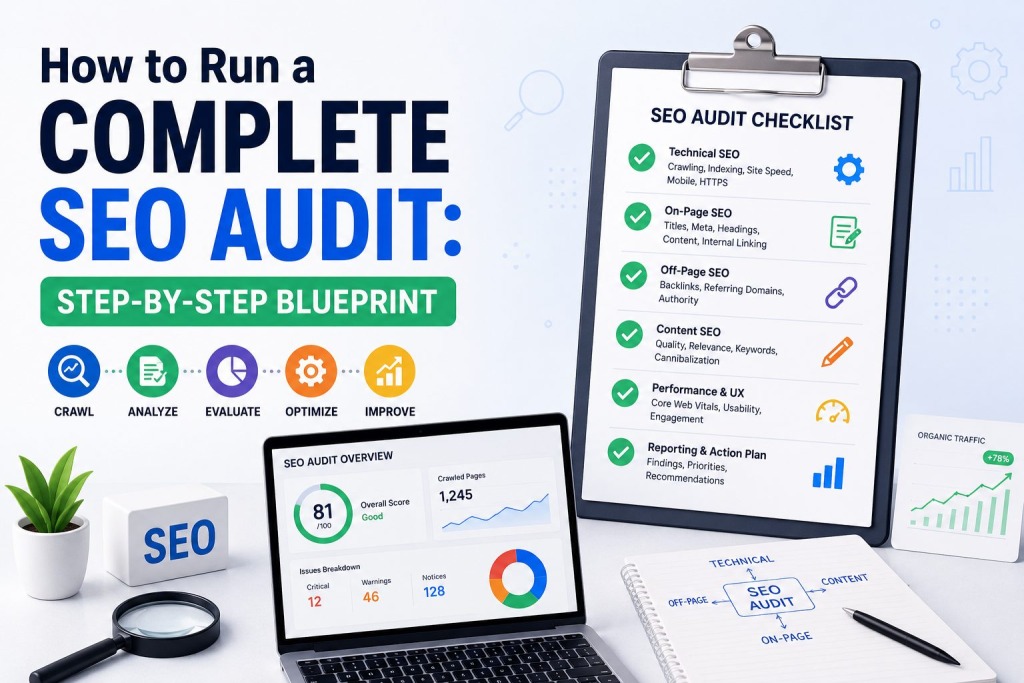
A SEO audit is that diagnostic tool that opens that door. It checks your whole web profile to find out what is preventing your pages from being on the first page of Google. This blueprint explains exactly how to diagnose your site, prioritize fixes, and turn lost rankings into measurable growth.
Setting up the Tech Sandbox
You need to make sure that search engine crawlers can actually find your pages, read them and index them before you start fiddling with title tags and digging into keywords. If Google can’t crawl your site efficiently, your on-page optimization efforts will be useless.
Crawling & Indexing Analysis
Start with a full site crawl, using an industry-standard tool like Screaming Frog, Ahrefs or Semrush. This simulation is like the way Googlebot crawls your architecture.
Go to the “Indexing” report in Google Search Console (GSC). Look closely for a huge gap between the number of pages you think you have and the number of pages Google has actually indexed.
Surmounting Major Technical Barriers
As you do your technical sweep, look out for these traffic killers:
- Robots.txt Misconfigurations: Don’t inadvertently block important folders or sections of your site with your robots.txt file.
- Sitemap Discrepancies: Only indexable pages with a 200 OK status should be included in your XML sitemap. Remove any pages that return 404 errors, redirects, or pages with noindex tags.
- Redirect Loops: Broken redirect chains waste your “crawl budget” the limited number of pages Googlebot will crawl on your site in a given session. Clean these up for a straight shot to active pages.
Page Speed, Core Web Vitals and Mobile Health
Google prioritizes the user experience. If your pages take 5 seconds to load on a mobile device, people will bounce and your rankings will fall.
Decoding the Core Web Vitals
Core Web Vitals are a set of specific, real-world metrics that measure user experience for loading performance, interactivity and visual stability. Run your domain through PageSpeed Insights and check three main metrics:
- Largest Contentful Paint (LCP): Measures how fast the content loads. The goal is to have the main content load in 2.5 seconds.
- Interaction to Next Paint (INP): Quantifies visual responsiveness. Set a goal of 200 milliseconds or less so your site feels snappy when clicking elements.
- Cumulative Layout Shift (CLS): A metric that quantifies the visual stability of a page. Reduce layout shifts during load – aim for a score less than 0.1.
Mobile-First Indexing Checklist
Google uses mobile-first indexing, so your desktop site is considered secondary. Test your layout on a few mobile viewports. Fonts must stay readable without zooming, touch targets (buttons and links) need to be spaced sufficiently, and heavy imagery needs to scale dynamically without breaking out of the page container.
Content Architecture and On-Page Optimization
Once you’ve got the technical bits nailed down, it’s time to work with what your users are actually seeing: your content and the HTML structure that sits behind it.
Meta Tags and Content Formatting Audit
Every page should have a clear hierarchy. Ensure that you organically use your primary keyword in one H1 tag per page. Break up the content logically with subheadings (H2, H3, H4) so readers can easily scan the text.
Check out the title tags and meta descriptions on your site. Look for duplicate titles, missing meta descriptions, or snippets cut short by character limits. The title tag needs to be an attractive headline and match the search intent of the targeted query.
How to Eliminate Content Decay and Cannibalization
Keyword cannibalization is when two or more pages on your site are competing for the same search intent. That means you’re competing with yourself, diluting your ranking power and confusing Google.
Organize your content by topic. If you find three thin, old articles on the same topic, combine them into one article that authoritatively covers the topic. If a page is no longer useful to the business or valuable to the reader, either redirect the page to a relevant page or delete the page.
Identifying On-Site Navigation Challenges
How your pages link to each other tells Google what pieces of content matter most. A flat, logical site architecture naturally spreads internal authority throughout your ecosystem.
Internal Link Distribution Optimization
If a page is more than three clicks from your homepage, it’s buried too deep. Use your crawl data to map out your site architecture. Prioritize your high-value service pages, product catalogs, and key resource guides with the most internal links.
Use descriptive anchor text instead of generic phrases like “click here” or “read more.” Linking to a dedicated strategy guide with the anchor text “comprehensive SEO audit”, for instance, provides unambiguous contextual cues to search engines about the content of the destination page.
Off-Page Analysis & Link Profile Security
Your off-page profile establishes your site’s authority and trust in your niche. A healthy backlink profile is like a vote of confidence from the rest of the web.
How to Find Toxic & Low Quality Backlinks
You can analyze your backlink profile with backlink analysis tools. Look for sudden, unnatural spikes in referring domains, very repetitive exact match anchor text from spam networks, or thousands of links from irrelevant, low-quality sites. Google is generally good at ignoring algorithmic spam. But, a manual review will save your brand from negative SEO footprints.
Gap analysis of competitors
Check out your direct organic competitors for link building opportunities. If five high-authority industry publications are linking to a competitor’s resource, but not yours, examine their content asset. Create a superior version of that specific content and contact those editors to suggest your new resource as an improvement.
Creating Your Fix-It Action Plan for Priorities
An SEO audit is only as good as the execution. Giving a long list of 500 errors to an engineering or content team will make people frustrated and slow down progress. Make your audit findings tiered for action, with each tier representing the impact of the finding and the difficulty of implementing the recommendation.
1. Address Critical Errors First:
Fix all site-wide crawl blocks, server errors (5xx), specific broken links (404s) on high traffic pages, and indexing issues identified in Google Search Console.
2. Optimize Site Speed and Mobile Assets:
Pass Core Web Vitals validation by compressing large imagery, lazy loading, minifying CSS/JavaScript assets and fixing layout shifts.
3. Clean Up Structural Content Issues:
Keyword cannibalization Fix duplicate or missing meta tags, fix broken internal links and merge overlapping content
4. Execute On-Page and Link Upgrades:
Enhance internal link distributions with descriptive anchor text Refresh declining content assets Scale out your contextual backlink outreach
Conclusion
Running a full SEO audit requires balancing technical diagnostics, content analysis, and user experience testing. Consider this blueprint as a living document, not a one-off crisis response, and plan for a full audit every quarter or biannually. Sites grow , code changes , and breaks over time . Search engines evolve . Ongoing optimization keeps your digital storefront open and unlocked for your audience to see.
If you’re scaling your day-to-day and find yourself overwhelmed with managing server logs, analyzing core web vitals, and rebuilding content silos, consider working with an experienced agency like Authority Lighthouse to take the technical heavy lifting off your plate and fast-track your organic growth.
Frequently Asked Questions
How often should I perform an SEO audit?
For small to mid-sized websites, a full audit every six months is usually enough. If you’re a large e-commerce platform, or an enterprise site with thousands of dynamic pages, a quarterly technical audit will help you catch critical crawl errors before they impact traffic.
What tools do I need to complete a standard SEO audit?
You can do a full audit with a combination of free and paid tools. Important tools are Google Search Console and Google Analytics for performance data, a dedicated site crawler (like Screaming Frog) for mapping technical glitches, and an all-in-one platform (like Ahrefs or Semrush) for backlink and competitor analysis.
Will fixing technical SEO issues give me instant ranking results?
Some fixes are instant, such as unblocking a directory you accidentally blocked in your robots.txt file. Most structural changes, however, like improving site speed or fixing content cannibalization take a few weeks to a few months for Google to crawl, assess and reflect in updated search rankings.
What is the difference between a technical audit and an on-page audit?
Technical SEO is the audit of the technical foundation of your website. It primarily involves how easily search engines can crawl and index your pages. An on-page audit analyzes the visible factors of individual pages such as content depth, readability, keyword usage, and meta tags.
Can an SEO audit help fix a traffic drop caused by a Google core algorithm update?
Yes. A core update generally indicates Google has increased its quality or user experience thresholds. A full audit lets you methodically find thin content, identify poor user experience metrics and structural shortcomings that caused your site to fall out of favor during the update.
Last Updated: June 5, 2026