Start with a Story, Not Imagined Gameplay
A game-inspired cinematic may be the first thing people see of an indie project. Perhaps it goes to a small online community, or lands in a publisher’s inbox with a pitch. Either way, those few scenes shape what people expect from the game before there is necessarily a playable build to show them.
That makes the purpose of the footage worth settling early. A concept cinematic can introduce a world, a protagonist or a conflict without demonstrating any mechanics. Carefully planned scenes, consistent characters and readable transitions give viewers something to follow. They also help you avoid implying that development is further along than it is.
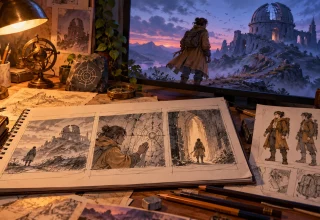
Write down what you want the audience to understand. Two or three sentences are enough: an explorer returns to an abandoned observatory, finds a symbol they recognise and discovers that someone has been there recently. Pin that premise above the desk. When a new shot occurs to you, ask how it contributes to that story. An impressive image may still belong in another project.
Build a Storyboard Around Concept Scenes
The storyboard is where that premise becomes a sequence of shots. Give each panel a job. One might establish a location; another might show a reaction or delay a reveal. If you cannot explain what a panel contributes, try removing it and see whether the sequence loses anything.
For the observatory example, you could start with a distant view of the building on a windswept hill. Cut closer as the explorer brushes dust from an unfamiliar symbol. Then show a doorway glowing in the dark. These scenes suggest a setting and a mystery. None requires you to claim that the environment or character already exists in a playable build.
Alongside each panel, record enough detail for someone else to understand the shot:
- The composition and camera angle.
- Any intended camera movement.
- The lighting and the character’s position.
- The reaction or feeling the shot should convey.
Keep confirmed story details separate from ideas you are still testing. You might know that the observatory is abandoned while remaining undecided about what lies behind the door. Marking that distinction now saves confusion when the concept changes. Otherwise, a visual experiment can quietly become something everyone assumes has been approved.
Establish Original Characters and Licensed Assets
Genre references can help you explain a mood, but take care with the designs themselves. Develop your own characters rather than copying a recognisable hero, signature costume or distinctive prop without permission. Check any third-party material you plan to use; finding it online does not establish that it is available for your project.
A character reference sheet gives the team a shared starting point. Record facial features, clothing, proportions, colours and accessories. Include small details that are easy to overlook: a chipped tooth, a missing button or a scarf that hangs below the coat. Approved concept art and properly licensed assets can then guide later shots.
Read the licence before committing to an asset. Does it cover commercial distribution, modification and promotional use where those are needed? Keep a copy of the relevant terms with the project files. It is much easier to answer those questions while choosing assets than while preparing a finished cinematic for release.
Clear references also help when you use AI-assisted tools to explore environments, lighting or composition. You could compare a misty dawn with a stormy dusk, for example, while keeping the same setting and character. The AI video generator from Magic Hour is one option worth considering when planning concept footage, as long as the creator checks the relevant asset rights and output terms before using anything.
Treat those outputs as material to review. A striking image is useful only if it fits the world you are building and can be used as intended. Keep checking against the references rather than letting each attractive result pull the project in a different direction.
Maintain Character Consistency Across Shots
A character can look convincing in one generated shot and noticeably different in the next. The jacket changes shape, an earring disappears or the face looks older. Viewers may not stop to name the problem, but the sequence can feel as though it contains several different people.
Compare every new shot with the approved reference sheet before adding it to the edit. Check the wardrobe and facial proportions first, then look at the surrounding scene. Lighting direction, background objects, colour grading and screen position all affect whether the cut feels continuous. A character looking left in one shot and right in the next may need a clear reason for that change.
Character replacement workflows can help you explore alternative designs during preproduction. Magic Hour AI character replacement is one tool option for this kind of visual experimentation. Review each result for permissions, continuity and suitability before deciding to keep it. Trying a different coat is an experiment; accepting the new version means checking what else changed with it.
Pay particular attention to close-ups, transitions and important props. Hands and faces deserve a frame-by-frame look where they carry the story. Watch for extra fingers, shifting features or an object changing between shots. Revise an inconsistent result or leave it out. Keeping it because most of the sequence looks good simply moves the problem into the final review.
Use Editing to Strengthen the Narrative
Once you have chosen the shots, editing determines what the audience makes of them. Two images can work individually and still be confusing together. The order, duration and transition between them need to make the relationship clear.
Wide shots establish the geography. Medium shots let viewers follow an action, while a close-up can draw attention to a discovery or a hesitant reaction. Use camera movement when it helps the scene. If viewers need time to notice a symbol on a wall, a complicated move may distract from the thing you want them to see.
Sound can connect the shots as well. Wind across the hill might continue into the observatory before giving way to the creak of a floorboard. Music, ambient audio and effects all need suitable usage rights. Leave room for silence, too, particularly when a pause will make a small sound or reaction more noticeable.
Review the cut scene by scene. Look for repeated information, abrupt changes in location and moments that imply something the premise does not support. Then watch it again after a break. A transition that seemed obvious during editing may be much less clear the following morning.
The finished sequence needs a coherent idea running through it. Resist adding a spectacular shot simply because you have it. If it interrupts the story or suggests an unconfirmed game feature, it may do more harm than a quieter image that belongs there.
Consider Accessibility and Clear Labeling
Plan accessibility while you are drawing the storyboard. Important information should not depend entirely on colour or sound. Think about how someone will follow the sequence with the audio off, or distinguish two objects that have similar shapes but different colours.
Captions should carry dialogue and meaningful sound cues. On-screen text needs sufficient contrast, readable sizing and enough time on screen to be understood. Check it on a phone as well as a large monitor; a title that looks clear at the editing desk can be difficult to read on a smaller display.
Avoid unnecessarily intense flashing, cluttered frames and rapid cuts that make the action hard to follow. Where appropriate, provide an audio description or a short written scene summary for visual information that the soundtrack does not convey. Decide what the audience needs to understand, then check whether the available formats communicate it.
Label the footage according to how it was made and what it represents. If it contains AI-generated imagery, previsualisation or characters that have not been implemented, say so in an opening slate, the description or accompanying project notes. For example: “Original game concept cinematic — illustrative preproduction footage, not actual gameplay.”
That wording is useful only if it accurately describes the material. Generated scenery is not evidence of a completed level, and a speculative character movement does not demonstrate a tested mechanic. Do not invent development milestones, performance results or claims about a playable build to make the concept sound further along. Give the audience a clear account of what they are watching.
Review the Cinematic Before Publication
Before releasing the cinematic, review its narrative, visual continuity, licensing, accessibility and factual claims. Every shot should support the intended story. Every asset should have a recorded source and any permission needed for its intended use. A simple spreadsheet can hold the asset name, where it came from and the applicable licence or agreement.
Check the captions against the audio, read every title and watch the transitions at normal speed. Confirm that the description matches the production status of the footage. If a scene could be mistaken for gameplay, revise it or explain it more clearly before release. Do not rely on viewers finding a qualification buried elsewhere.
For an indie team, a concept cinematic is a way to communicate an idea. The storyboard gives that idea a sequence; reference sheets help it retain a visual identity; the final checks catch problems before they reach the audience. You can present an imaginative fictional world while being straightforward about which parts are concepts and which, if any, have been built into a game.
Last Updated: October 27, 2026