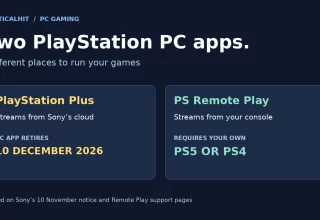
Sony is closing the PlayStation Plus PC app on 10 December 2026. If you use PS Remote Play to reach a PS5 or PS4 from your laptop, the app named in the closure notice is the other one. Remote Play connects to your own console. The PlayStation Plus PC app streams games from Sony’s servers.
The announcement appeared at the end of Sony’s 10 November Game Catalog post. Sony says fewer than 0.4% of eligible Premium members used the PC app and that it will contact affected users directly. That is a small share of subscribers, but a big change for someone who bought Premium to play on a computer.
Which PlayStation app is closing?
Look at the name of the app you open before a session. There are two ways to put a PlayStation game on a PC screen, and the hardware behind them is different.
| PC app | Where the game runs | What the announcement covers |
|---|---|---|
| PlayStation Plus | Sony’s cloud servers | PC app retires on 10 December |
| PS Remote Play | Your PS5 or PS4 | A separate app with its own console requirements |
A PC-only Premium subscriber loses the cloud route. Having a controller and a fast connection is enough to make the two arrangements look similar from the desk, but Remote Play also needs a PlayStation at the other end.
What you need for Remote Play on a PC
Sony’s Remote Play instructions walk through connecting a Windows PC or Mac to a PS5 or PS4. Sign in to the account associated with your console, connect a compatible controller to the computer, then select your PS5 or PS4 in the app.
On PS5, the switch is under Settings → System → Remote Play → Enable Remote Play. For sessions started while the console is resting, Sony also tells you to enable its internet connection and network wake option in the Rest Mode settings. Try a session while you are near the console before relying on it away from home.
Can it take over your streamed games?
The game you want to play matters as much as the app. Sony’s Remote Play compatibility notes exclude games that must be streamed through a PS Plus Premium membership. Installing Remote Play therefore gives a PC-only cloud player another piece of software, but they still need a console and a compatible game running on it.
That matters if you mainly use Premium for titles available through streaming. Check the particular game and how you access it before planning your next session around Remote Play. CriticalHit’s guide to gaming subscriptions across devices explains the broader differences between running a game locally, using a console remotely and accessing a cloud service.
VGC’s report places the PC closure in Sony’s wider PC coverage. For your own setup, start by checking the name of the app you use. Keep an eye on the direct message Sony has promised users of the PC service.
Last Updated: November 11, 2026