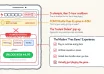
There’s certainly a lot of work that can go into a successful sales call—send the deck, find the right case study, write a follow-up and schedule the next meeting. There are many ways to simplify that. One option is a digital sales room. With a single link, you can deliver all the necessary materials to the buyer and their team and allow them to revisit the discussion. They can add team members to the discussion as well as see the latest version of any proposal. And they don’t have to search their inbox.
The best digital sales rooms give startups a simple way to organize the buyer journey and keep prospects engaged after a meeting. Rather than having to send multiple emails with attachments that include presentations, links to presentations, documents and reminders of follow-up conversations, the salesperson can simply provide the buyer with one link that contains all of the materials they’ll need to continue the conversation. This model can also aid in helping internal champions share information with their colleagues and keep large deals alive.
When selecting a digital sales room tool for a small company, the primary consideration is how much work the room will eliminate. Some platforms turn meetings into follow-up pages. Other digital sales rooms provide integrated proposals, e-signatures, and/or onboarding. This comparison evaluates publicly stated products and services offered by vendors and their likely fit for startups. The ranking reflects these differences in functionality; prior to purchasing, evaluate the features contained within the package you’re evaluating.
Digital sales room tools at a glance
| Rank | Tool | Best fit | Main strength |
|---|---|---|---|
| 1 | GetAccept | Deals requiring proposals and signatures | Deal rooms and contract workflows |
| 2 | FollowUp | Founders and early sales hires | Rooms created from call transcripts |
| 3 | Distribute | Teams with heavy post-call work | AI-assisted deal rooms and follow-up emails |
| 4 | Aligned | Several stakeholders on each deal | Shared tasks and mutual action plans |
| 5 | Trumpet | A branded buyer experience | Interactive Pods and shared sales content |
| 6 | Dock | Sales teams working with customer success | Workspaces spanning sales and onboarding |
| 7 | Arrows | Established CRM workflows | Sales rooms connected to deal context |
| 8 | Paage | A simple buyer page | Sales materials in one trackable link |
1. GetAccept
Our top recommendation for startups looking for a proposal, engagement and electronic signature platform as part of their digital sales room solution is GetAccept. This combination is significant when there are additional phases that occur after a meeting. A prospect might need to review your offer, discuss issues regarding your offer, engage procurement personnel, and sign an agreement before the deal can advance.
The platform integrates these processes into a broader deal workflow with CRM integrations and provides insight into prospect engagement. GetAccept would represent a logical starting point for a team attempting to minimize the quantity of standalone tools between presenting your product or service and signing an agreement. Create a real proposal during your trial and determine which signature and CRM features your selected package includes.
2. FollowUp
FollowUp is focused on founding account executives and small sales teams. Their core concept is to utilize the transcript from a sales call to create a personalized room instead of asking a busy seller to develop every subsequent follow-up page individually.
It merits consideration when calls are occurring and the subsequent follow-up continues to fall behind. A founder can provide a buyer with a summary of the discussion and relevant resources without expending an additional afternoon configuring them. The practical assessment is whether the first draft accurately captures the prospect’s priorities and excludes topics that were discussed internally rather than topics agreed upon with the customer.
3. Distribute
Similar to FollowUp, Distribute also addresses post-meeting activities. However, its Dante assistant creates deal rooms from calls and prepares the subsequent follow-up email. The rooms can contain a recap of the meeting, pricing, demos, timelines, etc., which a buying team may desire.
It represents an attractive alternative for startups wishing to implement a standard process among several sellers. Templates and establishing a shared brand setup can serve as a starting point for representatives while providing flexibility to incorporate buyer-specific details. Determine how the tool handles your call recordings and how easy it is for the representative to correct a draft prior to sharing it. An automated preparation process only benefits the representative if reviewing the result requires less effort than doing the work manually.
4. Aligned
Aligned serves as a strong alternative for opportunities that involve individuals from both sides. Its rooms combine shared resources with tasks, timelines and mutual action plans. A mutual action plan documents steps required from each side in order to complete the sale. The structure assists when a purchase requires a security review, a pilot or approval from another department.
Instead of yet-another email asking where things stand regarding completion of a task, the room provides participants with common ground upon which they can update each other. From a startup perspective, the key question is whether buyers will participate. Start with short plans that reflect agreement upon how processes should operate rather than filling the entire room with unaccepted tasks.
5. Trumpet
Trumpet refers to its shared buyer pages as Pods. The Pods provide access to sales content, videos, mutual action plans and other deal resources in a branded destination. The attractiveness of the option lies in providing a more coherent user experience than sending attachments at different stages throughout the selling process.
For startups offering complex services or products, this presentation makes it easier for buyers to explain the offer inside their organization. A buyer can pass the pod on to a colleague who may have missed the demonstration. Evaluate the experience from that colleague’s perspective: does the page clearly outline the problem, solution and next decision? Branding helps, but a clear pathway for buying should carry the page.
6. Dock
Dock’s customer workspaces support sales, onboarding and later account collaboration. A team can organize a proposal and evaluation plan before closing a deal and then utilize workspaces for implementation milestones and customer resources following closing.
This makes Dock worth considering when sales and customer success regularly hand off responsibilities to each other. The benefit provided by using Dock is continuity – goals, scope and agreements made between parties remain somewhere beyond the closing email. Determine who will maintain that information and what material will carry over into onboarding. A broader workspace is most valuable when someone owns the transition.
7. Arrows
Arrows represents an opportunity for startups already running their sales processes through a CRM. While its sales rooms collect deal milestones, resources and next steps around individual deals, Arrows offers wider integration options including HubSpot & Salesforce.
The useful distinction is how closely the buyer-facing room fits the existing activity of the representative. Prior to choosing Arrows, verify which items are synchronized, where activity appears & which actions still require manual entry. CriticalHit’s guide to connecting sales activity with buyer context explores why that joined-up view matters. A room should assist the team in understanding the deal rather than become additional records to manage.
8. Paage
Paage provides a simpler proposition – bundle client-facing sales content into a personalized trackable link. This would be suitable for a founder or account executive primarily looking to share a presentation, proposal and case studies in a neat page.
It is worth considering when creating a full collaboration workspace seems excessive to your sales process. Utilize a trial period to evaluate content formats, buyer accessibility and detailed tracking of buyer engagement within the application. If you also need task management, contract workflows or certain CRM connections – verify requirements separately prior to relying solely on the page to move forward on an entire deal.
What should startups assess before choosing?
Start with one recent opportunity. Replicate your follow-up utilizing tools on your shortlist and identify how quickly you can distribute a usable room. Evaluate buyer accessibility on mobile phones, share it with coworkers and revise your proposal. This will reveal more than vendor-demonstrated polish.
Examine engagement reports thoroughly. Viewing a page could prompt a better question, but does not establish an intention to buy. Identify if the platform segregates known visitors from anonymous users and if buyer signals reach your CRM.
Consider privacy here too. The UK’s Information Commissioner’s Office explains in its guidance on business marketing and personal data that identified contacts may still represent personal data. Ask what information regarding visitor behavior is recorded by the application – for how long will that information be stored and how will your organization explain that use?
Prior to uploading customer-sensitive materials, verify access permissions. The National Cyber Security Centre recommends granular permissions and revoking unused access in cloud guidance on secure user management. Test who can access a shared link during your sales room trial and how you remove that access when an opportunity closes.
Finally, price the workflow you will use daily. Consider required seats, CRM integration, branding, signature features and any utilization limitations when comparing costs at your current team size versus future team sizes after adding new hires. A low-cost subscription could become an entirely different decision once critical features reside on another tier.
Selecting a room your team will use
GetAccept ranks first on this list for startups seeking proposals, engagements and electronic signatures along with their digital sales room solutions. FollowUp & Distribute deserve consideration when post-call preparation is your team’s greatest bottleneck. Aligned, Trumpet, Dock, Arrows and Paage offer various options for collaboration, presentation, transitions between sales and customer success, CRM fit and simple sharing.
Run your opportunity through both of your candidates’ digital sales rooms and select a room your reps can keep accurate and your buyers can navigate without assistance. Habits such as these will ultimately outweigh long lists of features.
Last Updated: November 16, 2026