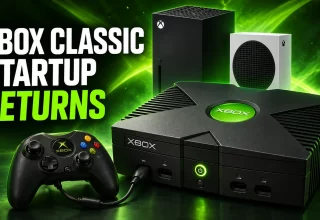
The original Xbox start-up screen is back. If you have a Series X, Series S or an Xbox One, you can switch to the classic screen as part of the anniversary rollout. To do this, go to Settings > System > Startup.
You also have both the 2005 and 2010 versions of the Xbox 360 opening animation. Which version you prefer may depend on which model used to sit underneath your television.
What has been released?
On 15 November, Xbox announced the update for all Xbox Series X|S and Xbox One players. It said the update would roll out throughout that day, but gave no specific time for each individual system.
This clears up some confusion. Before the official announcement, people saw references to the three animations in patch notes. Those references were later changed. Pure Xbox followed those findings and updated its article once the rollout became official.
Look at the update at the top of that report. The older portion still states that the animations are unavailable. The two portions explain different stages of the rollout. Reading only the older section leaves you with an outdated answer.
Where do I find the animation options?
To find the animation options on your console:
- Open Settings.
- Choose System.
- Select Startup.
- Choose your desired animation from the options: original Xbox or a 2005/2010 Xbox 360 version.
You can also adjust your sound preferences in this same menu if you want the accompanying audio.
In Microsoft’s September Xbox Insider announcement, the company identified this menu path while previewing options spanning Xbox One and the newer generation. The September preview and November public release are separate events. Information saying you needed to join the Insider programme refers to an earlier phase. Xbox’s recent announcement explicitly names all players on the supported consoles.
My console does not show them
First, check if there are any pending updates on your console. Try returning to Startup later if the options still are not available. Checking for an update is a first step; it does not guarantee that installing one will resolve every case.
Xbox has not explained all the possible reasons an option may be missing. You do not need to search through unrelated menus for this anniversary extra. Startup is the menu Microsoft identified. If your desired introduction is not listed, the official announcement gives no more precise timetable for your particular console.
It is a smaller anniversary addition than the Wolfenstein 3 news CriticalHit covered earlier in the week. Still, choosing which Xbox era greets you before the dashboard is a nice way to put those years back on the screen.
Last Updated: November 16, 2026