
Pokémon GO is built around real-world exploration. That is what makes the game exciting, but it also creates a challenge for many players. Not everyone lives near dense PokéStop areas, raid hotspots, special events, or region-exclusive Pokémon. For rural players, busy workers, travelers, or people who simply cannot move around as freely, the question often becomes: is there a practical way to change location on Pokémon GO?
The answer is yes, but it is important to understand the risks, the available methods, and the difference between a basic fake GPS app and a more complete location-changing tool. Spoofing your location in Pokémon GO can violate Niantic’s rules, so players should avoid reckless teleporting, modified game clients, cracked apps, and unrealistic movement patterns.
This guide explains how Pokémon GO location spoofing works, what iPhone and Android users need to know, and why a desktop-based tool like Fonelora Location Changer can be a more practical option for users who want a cleaner and more controlled setup.
What Does Spoofing Location on Pokémon GO Mean?
Spoofing location means changing the GPS position reported by your phone so that Pokémon GO believes you are somewhere else. Instead of physically walking to another city, park, or raid area, your device sends a different GPS location to the app.
Players usually search for Pokémon GO spoofing methods because they want to:
- Catch region-exclusive Pokémon
- Join raids in active cities
- Access more PokéStops and Gyms
- Play when traveling is not possible
- Simulate walking routes
- Explore event locations remotely
- Use joystick-style movement for easier navigation
However, location spoofing is not the same as using a VPN. A VPN changes your IP address, but Pokémon GO mainly relies on GPS data from your device. This is why many players install a VPN and still see their real Pokémon GO location. To change your in-game position, you need a tool that can modify or simulate GPS location data.
Before You Spoof: Understand the Risk
Before using any Pokémon GO spoofer, you should understand one thing clearly: spoofing is not officially supported by Niantic. Using fake GPS data, modified apps, or unauthorized third-party tools may put your account at risk.
That does not mean every method has the same risk level. Some approaches are clearly more dangerous than others. For example, cracked Pokémon GO apps, unofficial modified clients, suspicious APK files, and random free spoofing tools can create more problems than they solve. They may trigger login issues, Error 12, rubber-banding, or account warnings.
A safer approach is to avoid modified Pokémon GO apps and choose a location changer that works with the official Pokémon GO app, supports realistic movement, and does not require jailbreaking or rooting your phone.
Common Ways to Spoof Pokémon GO Location
There are several ways players try to change their location in Pokémon GO. Each method has different requirements and risk levels.
1. Android Fake GPS Apps
Android users often start with fake GPS apps from app stores or APK websites. These tools usually require enabling Developer Options and selecting a mock location app.
This method may work for some basic location-based apps, but Pokémon GO can be more sensitive. Users may encounter problems such as:
- Error 12: Failed to detect location
- GPS snapping back to the real location
- Joystick lag
- App crashes
- Mock-location detection
- Unstable route movement
For casual users, Android fake GPS apps may feel easy at first, but they can become unreliable after system updates or Pokémon GO updates.
2. Rooted Android Methods
Some advanced Android users use root-based spoofing setups. Rooting can provide deeper control over device location, but it is not beginner-friendly. It may void warranties, create security risks, and cause problems with banking apps, payment apps, or system updates.
This method is usually not suitable for everyday players who simply want to change Pokémon GO location without technical setup.
3. iPhone Jailbreak Methods
In the past, some iPhone spoofing methods required jailbreaking. However, jailbreaking is risky for most users. It can reduce system security, break iOS features, and create compatibility issues with newer iOS versions.
For most iPhone users, a no-jailbreak method is much more practical.
4. Desktop-Based Location Changers
Desktop-based location changers are becoming more popular because they do not require users to install a modified Pokémon GO app, root Android, or jailbreak iPhone. Instead, users connect their phone to a Windows or Mac computer and control the device’s GPS location from the desktop software.
This is where Fonelora Location Changer becomes a useful option.
Why Fonelora Location Changer Is Worth Considering
Fonelora Location Changer is designed for users who want to change GPS location on iPhone and Android without complicated device modification. Instead of relying on risky cracked apps or unstable mobile overlays, it provides a desktop-based way to manage GPS location, simulate movement, and control location behavior more precisely.
1. Works with iPhone and Android
One of the biggest frustrations with Pokémon GO spoofing guides is that many of them only work for one platform. Some are Android-only. Some require iOS jailbreak. Others are outdated after a system update.
Fonelora Location Changer supports both iOS and Android devices, which makes it easier for users who switch phones or manage multiple devices. It is especially useful for households or players who use an iPhone as their main device but also have an Android phone for testing.
2. No Jailbreak or Root Required
For most users, this is the most important advantage. Fonelora Location Changer does not require jailbreaking an iPhone or rooting an Android device. That means users can keep their phone in a normal system state while still changing GPS location through the tool.
This matters because jailbreak and root methods can create unnecessary security and stability issues. A no-root, no-jailbreak setup is easier for beginners and safer for people who do not want to modify their device system.
3. Teleport Mode for Instant Location Change
Teleport Mode allows users to select a destination and move their GPS location there quickly. For Pokémon GO players, this can be useful when exploring a specific city, event area, park, or raid zone.
However, teleporting should be used carefully. Jumping from Los Angeles to Tokyo and immediately catching Pokémon can look unnatural. A good article or tool workflow should remind users to respect cooldown time and avoid unrealistic actions after long-distance movement.
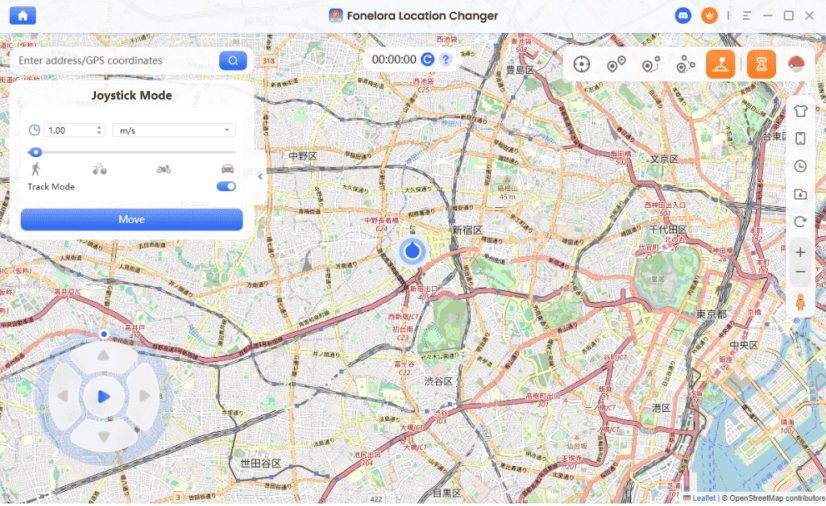
4. Joystick Mode for Manual Movement
Joystick control is one of the most requested features among Pokémon GO players. Instead of repeatedly changing location manually, users can move around the map in a more natural way.
Fonelora Location Changer includes joystick-style movement, which can help simulate walking around a park, raid area, or PokéStop cluster. This is useful for players who want more control than a simple one-click fake GPS app can provide.
5. Route Simulation for More Natural Movement
Route simulation is another important feature. Instead of teleporting from point to point, users can create a movement path between locations. This is especially helpful for location-based games because natural movement patterns are usually more realistic than sudden jumps.
Fonelora supports movement simulation modes such as single-spot and multi-spot route control. Users can plan a route, adjust movement speed, and simulate walking between different points.
For Pokémon GO users, this can make the experience smoother when moving between PokéStops, Gyms, or raid areas.
6. Better Control Than Random Free GPS Apps
Free fake GPS apps may be tempting, but many of them come with limitations. Some are filled with ads, some require confusing developer settings, and some stop working after updates. Others may not be suitable for Pokémon GO at all.
Fonelora Location Changer is positioned as a more complete desktop solution. It focuses not only on changing location, but also on controlled movement, route planning, joystick operation, and cross-platform support. For users who want a more stable workflow, that difference matters.
How to Spoof Pokémon GO Location with Fonelora Location Changer
The exact interface may vary depending on your device and software version, but the general workflow is simple.
Step 1: Download and Install Fonelora Location Changer
Go to the official Fonelora Location Changer website and download the software for Windows or Mac. Avoid cracked versions or third-party download sites because they may contain malware or outdated files.
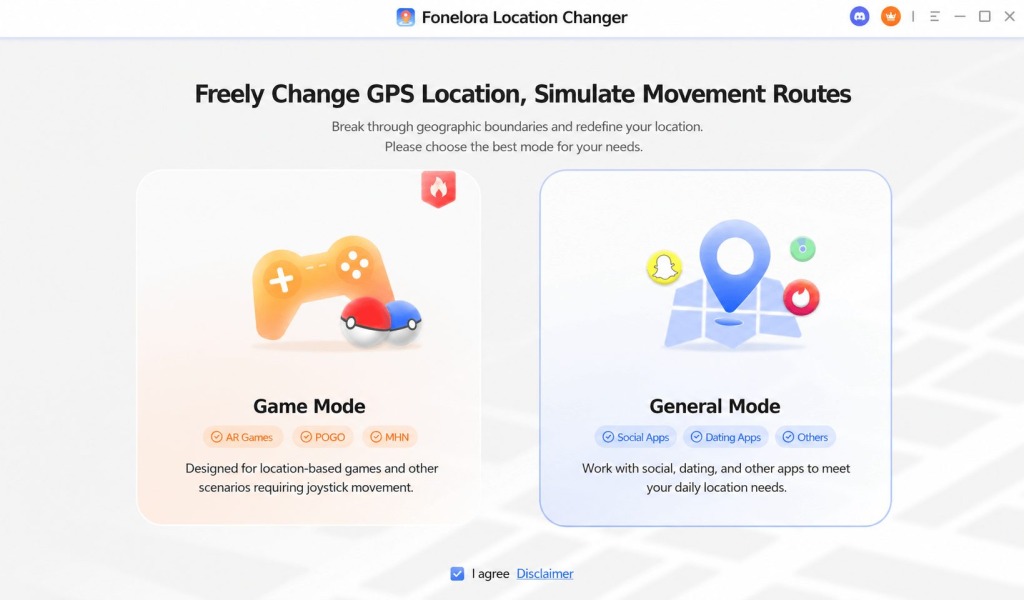
Download Fonelora from the official site
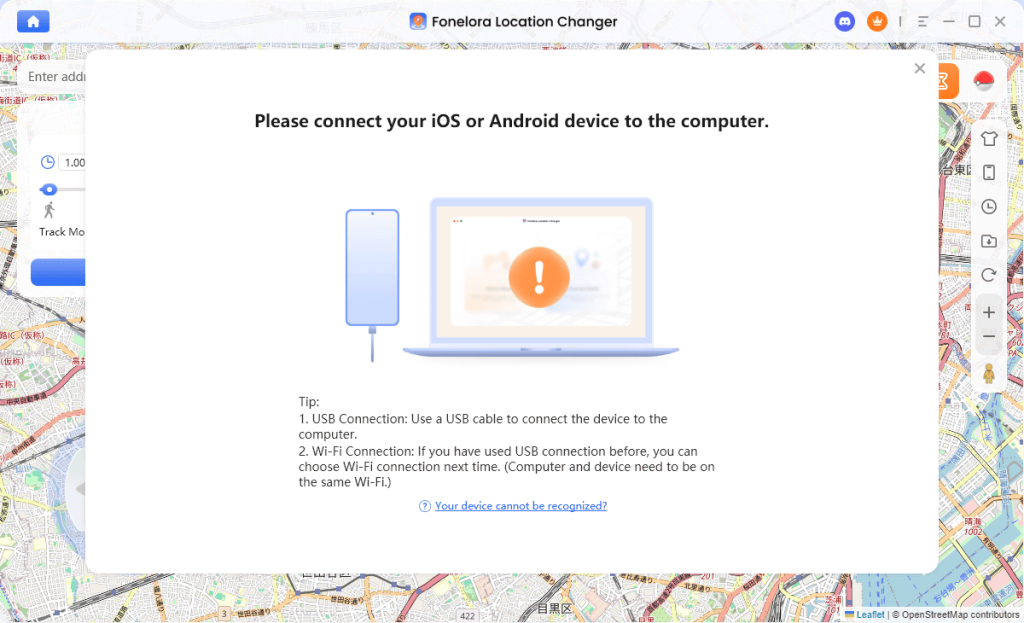
Step 2: Connect Your iPhone or Android Device
Connect your phone to the computer. Follow the on-screen instructions to authorize the device connection. Android users may need to enable the required settings, while iPhone users may need to trust the computer.
Select the mode that matches your goal:
- Use Teleport Mode if you want to change your GPS to one specific place.
- Use Joystick Mode if you want manual control.
- Use route simulation if you want to move between multiple points.
- Use multi-point routes if you want to simulate a longer walking path.
Step 4: Open Pokémon GO
After your GPS location is changed, open Pokémon GO and check whether your in-game location matches the selected position. If the game does not update immediately, restart the app and wait for the GPS signal to refresh.
Step 5: Move Naturally and Respect Cooldown
Avoid unrealistic behavior. Do not teleport across countries and instantly spin PokéStops, catch Pokémon, or join raids. If you move a long distance, wait before taking in-game actions. This reduces the chance of obvious location inconsistency.
Quick Comparison: Free GPS Tools vs. Fonelora vs. Jailbreak/Root Methods
| Method | Main Advantages | Main Limitations | Best For |
| Free GPS Modifiers | Easy to find, low cost, quick to test for basic location changes | Often unstable after updates, may trigger GPS conflicts or Error 12, limited movement controls, usually less reliable for long-term use | Casual users who only want to test basic GPS changing |
| Fonelora Location Changer | No jailbreak or root required, cleaner setup, better location control, supports features like teleport, joystick, and route simulation, generally more beginner-friendly | Usually paid, requires a computer connection for setup | Players who want a more stable, feature-rich, and easier-to-manage solution |
| Jailbreak/Root Methods | Deeper device-level control, can offer advanced customization for experienced users | More technical, higher setup complexity, potential security and device stability risks, may affect system integrity or other apps | Advanced users who are comfortable modifying their device |
For most everyday users, professional desktop tools are often the most balanced option because they offer more control than free GPS modifiers while avoiding the complexity and device-level risks associated with jailbreak or root methods. That is one reason tools like Fonelora Location Changer are often easier for beginners to start with.
Common Pokémon GO Spoofing Problems
Even with a location changer, users may still face problems if the setup is wrong or movement is unrealistic.
Error 12: Failed to Detect Location
Error 12 usually appears when Pokémon GO cannot read a valid location or detects a GPS conflict. This may happen with unstable mock-location apps, permission issues, conflicting GPS tools, or system-level detection.
To reduce this issue, avoid running multiple GPS tools at the same time, use the official Pokémon GO app, and make sure your location changer is compatible with your device system.
GPS Snapping Back
If your avatar keeps returning to your real location, your device may still be receiving real GPS signals, or another app may be overriding the spoofed location. Restarting the phone, reconnecting the device, or checking permissions may help.
Joystick Not Moving
If joystick movement does not work, check whether the phone is properly connected, whether the location mode is active, and whether Pokémon GO has refreshed the GPS position.
Account Warnings
If you receive a warning, stop spoofing immediately and avoid risky behavior. Do not continue teleporting or using modified apps on the same account.
Best Practices for Lower-Risk Pokémon GO Spoofing
No spoofing method can honestly promise zero risk. However, users can reduce obvious mistakes by following better habits:
- Do not use cracked Pokémon GO apps
- Do not install random APKs from unknown sources
- Avoid unrealistic teleporting
- Respect cooldown time
- Use normal walking speed when simulating routes
- Do not run multiple spoofing tools at once
- Test with a secondary account first
- Keep your software updated
- Use the official Pokémon GO app when possible
- Avoid “100% undetectable” claims from suspicious tools
Final Thoughts
Spoofing location on Pokémon GO is not just about changing a map pin. It involves GPS behavior, device compatibility, movement patterns, cooldown timing, and account risk. That is why many simple fake GPS apps fail or cause problems such as Error 12, rubber-banding, or unstable joystick movement.
For users who want a more structured way to change location on iPhone or Android, Fonelora Location Changer is worth considering. It supports GPS location changing, teleporting, joystick movement, and route simulation without requiring jailbreak or root. Compared with random free spoofing apps or modified Pokémon GO clients, it offers a cleaner and more controlled workflow for users who want to manage their device location more carefully.
Last Updated: June 10, 2026