A hard shutdown can turn an ordinary MySQL restart into a long recovery job. If the server loses power while it is writing, you may come back to failed queries, inaccessible data and messages such as:
Table ‘.\\mysql\\db’ is marked as crashed and should be repaired
Column count of mysql.proc is wrong. Expected 20, found 16. The table is probably corrupted
This review looks at the sensible first steps, then covers our experience with Stellar Repair for MySQL when the built-in options could not recover two damaged InnoDB tables.
What a forced shutdown can do to MySQL
During a normal shutdown, MySQL finishes or rolls back transactions, flushes pending writes and closes its files cleanly. Pull the power midway through that work and the files on disk may no longer match the state the storage engine expects at startup.
The symptoms depend on the storage engine. MyISAM may be left with a damaged .MYI index or partly written .MYD data file. InnoDB has crash recovery, so an interrupted transaction does not automatically mean a broken database. Trouble starts when recovery cannot reconcile the redo log, tablespace or individual table files. Damage to a shared ibdata1 file can also affect more than the table that was active when the machine stopped.
Before attempting any repair, make a copy of the database files and work on the copy where possible. A repair attempt changes evidence, and the wrong command can make a recoverable problem harder to undo.
Try the native recovery route first
The correct approach is determined by the table engine. Do not run MyISAM utilities against InnoDB files, and do not treat innodb_force_recovery as a repair command. It is an emergency setting intended to help you start the server and extract data.
MyISAM: check the table with myisamchk
Stop MySQL before using myisamchk, because the utility should not work on a table that the server still has open. On a copied table, the usual recovery command is:
myisamchk --recover table_nameReplace table_name with the table path or name required by your installation. If the server is running and the table is accessible, MySQL also provides:
REPAIR TABLE database_name.table_name;Both options are for MyISAM. They do not repair InnoDB tables. When the data or index file is badly damaged, myisamchk may stop without recovering every row.
InnoDB: start carefully, dump what is readable
InnoDB normally performs its own crash recovery at startup. If MySQL will not start, add innodb_force_recovery under [mysqld] in my.cnf or my.ini, beginning at level 1:
[mysqld]
innodb_force_recovery = 1
Increase the value only when a lower setting does not let the server start. Once it is running, export the accessible data immediately:
mysqldump -u user -p database_name table_name > table_dump.sql
mysqldump -u user -p database_name > full_database_dump.sql
Remove the recovery setting before returning the server to normal use. Higher recovery levels impose serious restrictions and levels above 4 can permanently corrupt data files. The goal is extraction, not continued operation.
If the dump repeatedly stops at the same table, native recovery may have reached its limit. That was the point at which we tried a dedicated MySQL database repair tool.
Our recovery test
The test server had four affected tables after a power interruption: two MyISAM and two InnoDB. myisamchk brought back the MyISAM pair. MySQL started with innodb_force_recovery set to 2, but mysqldump failed whenever it reached either damaged InnoDB table. There was no current backup containing the final session’s records.
We then used Stellar Repair for MySQL against copies of the database files. The application recovered both tables in this test. That is one result on one damaged dataset, rather than a promise that every corruption case will produce the same outcome.
Stellar Repair for MySQL: the recovery process
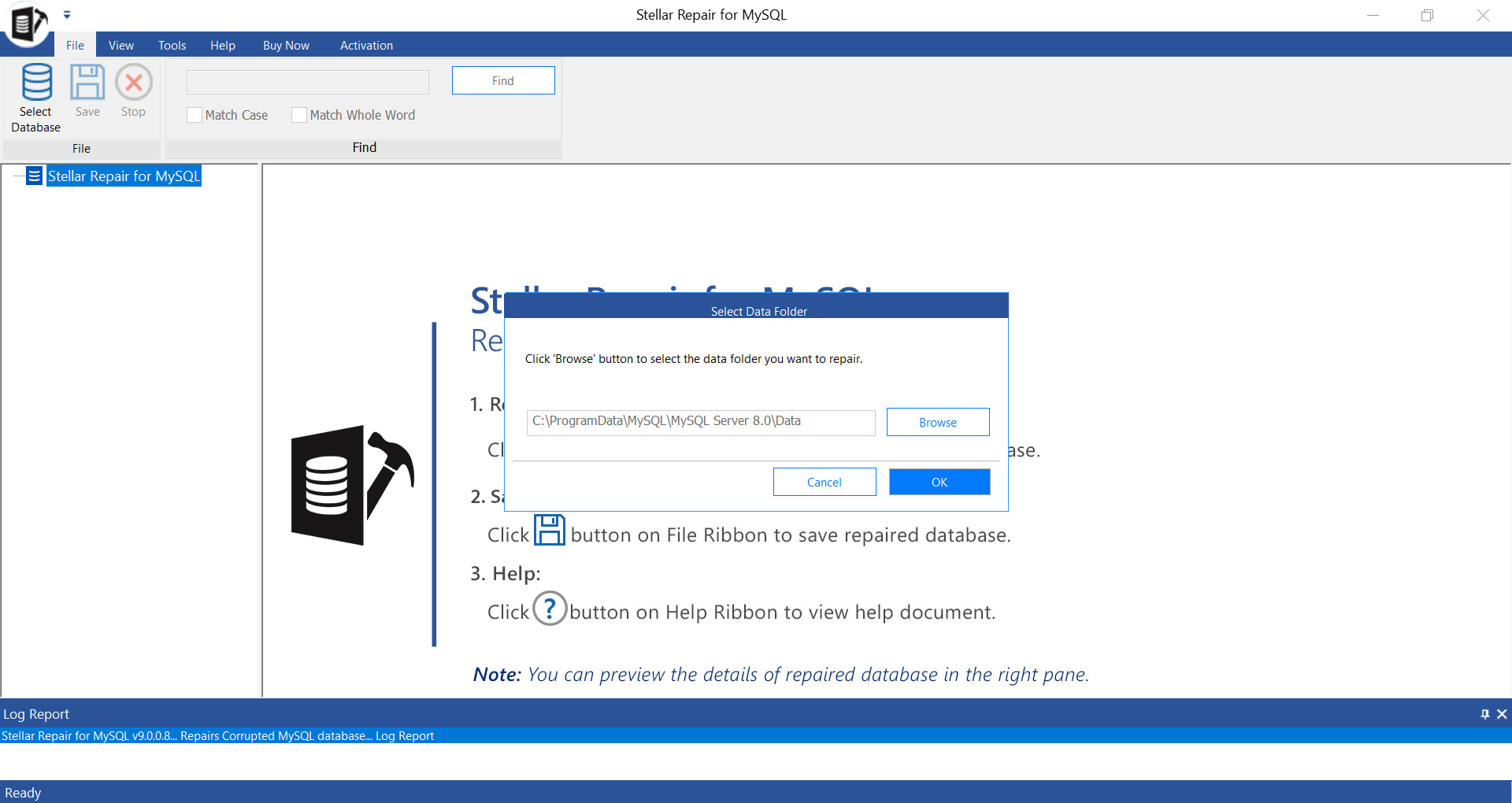
1. Stop MySQL and locate the data folder
The application reads the physical database files, including .ibd, ibdata1, .frm, .MYD and .MYI files, so the MySQL service needs to be stopped first. We opened the software and browsed to a copied data directory. A typical Linux installation stores data under /var/lib/mysql/; on Windows it is commonly under the hidden ProgramData folder, although the configured location may differ.
2. Choose the affected database
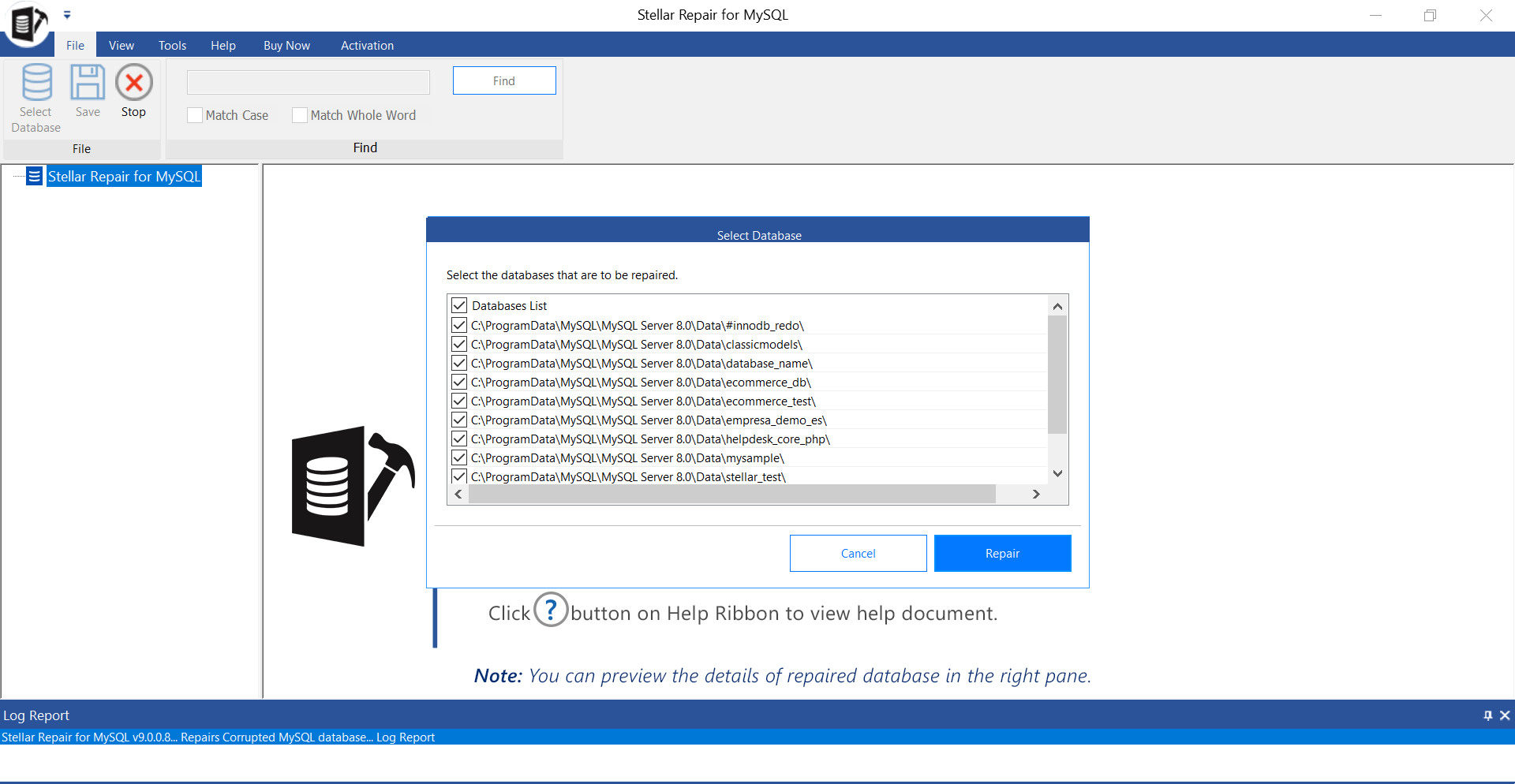
After reading the folder, the software displayed the databases it found. We selected the database containing the failed InnoDB tables. The interface also allows several databases to be selected for the same scan.
3. Run the scan
Clicking Repair started the scan. A progress display showed which stage was running, and the application reported when processing had finished. Scan time will naturally vary with database size, storage speed and the extent of the damage.
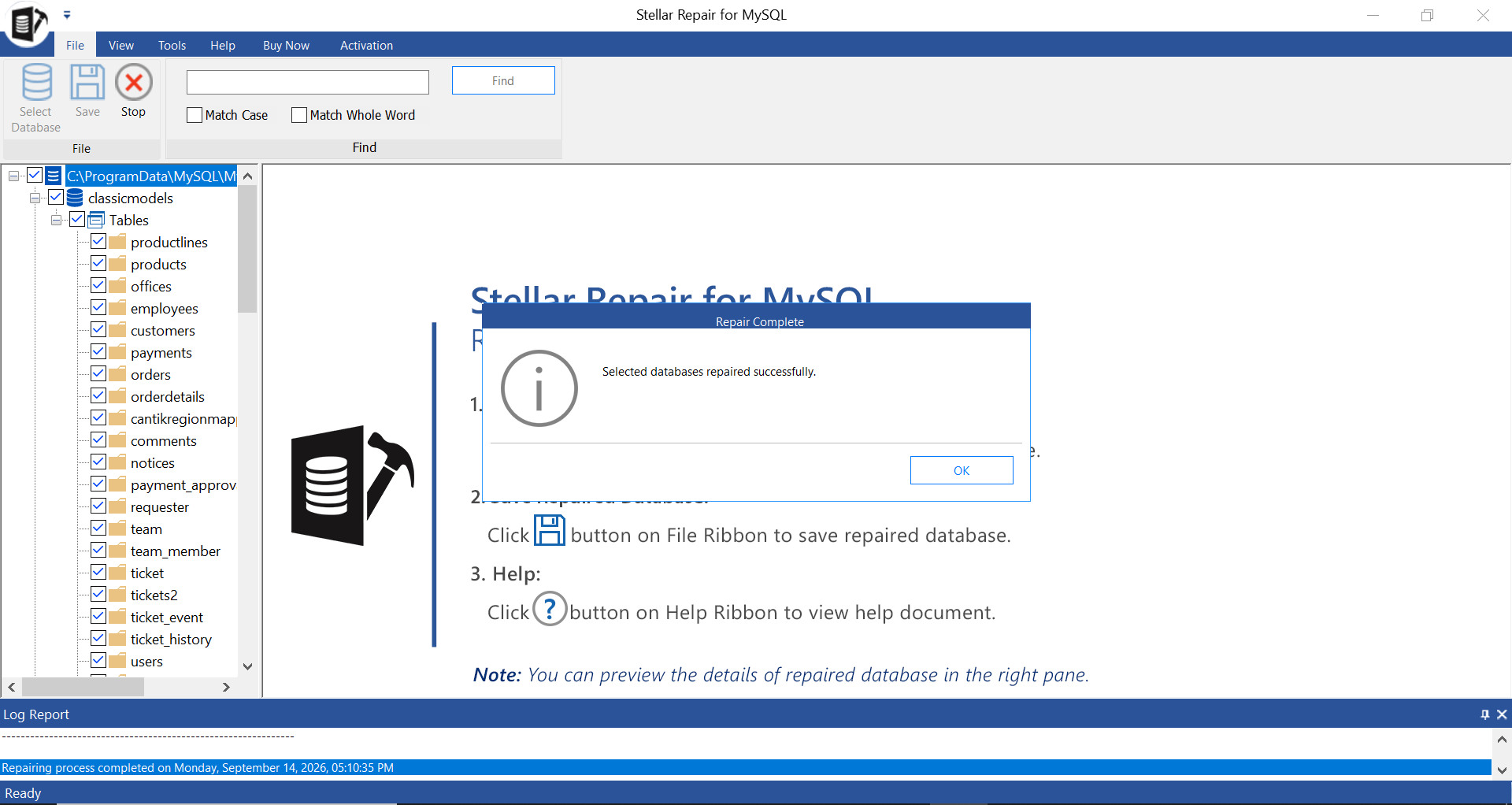
4. Inspect the preview
The preview was the most useful checkpoint. It showed recovered tables and related objects, and let us inspect rows before deciding whether to export. Both tables that had stopped mysqldump were visible, including records from the session active during the shutdown.
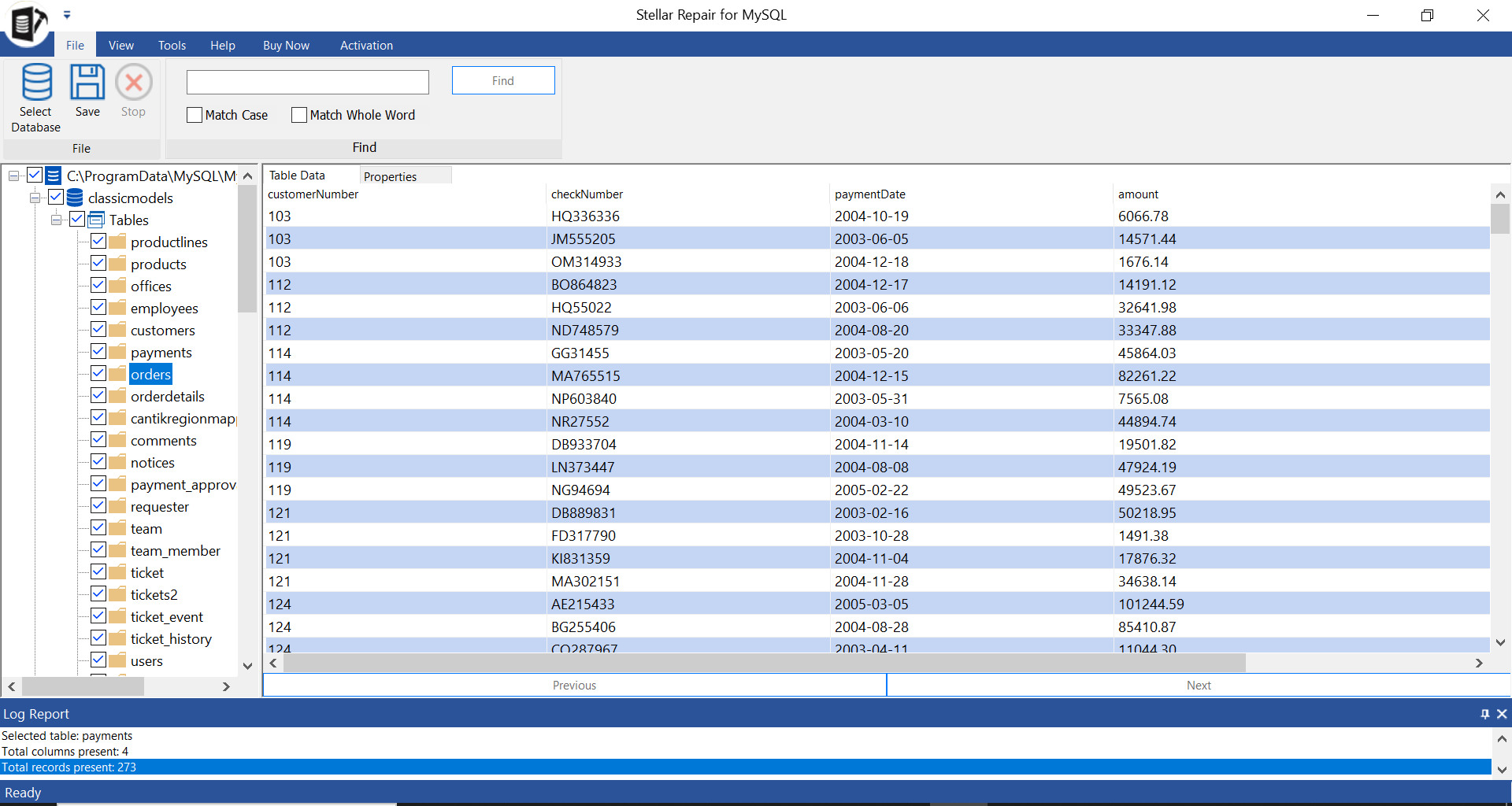
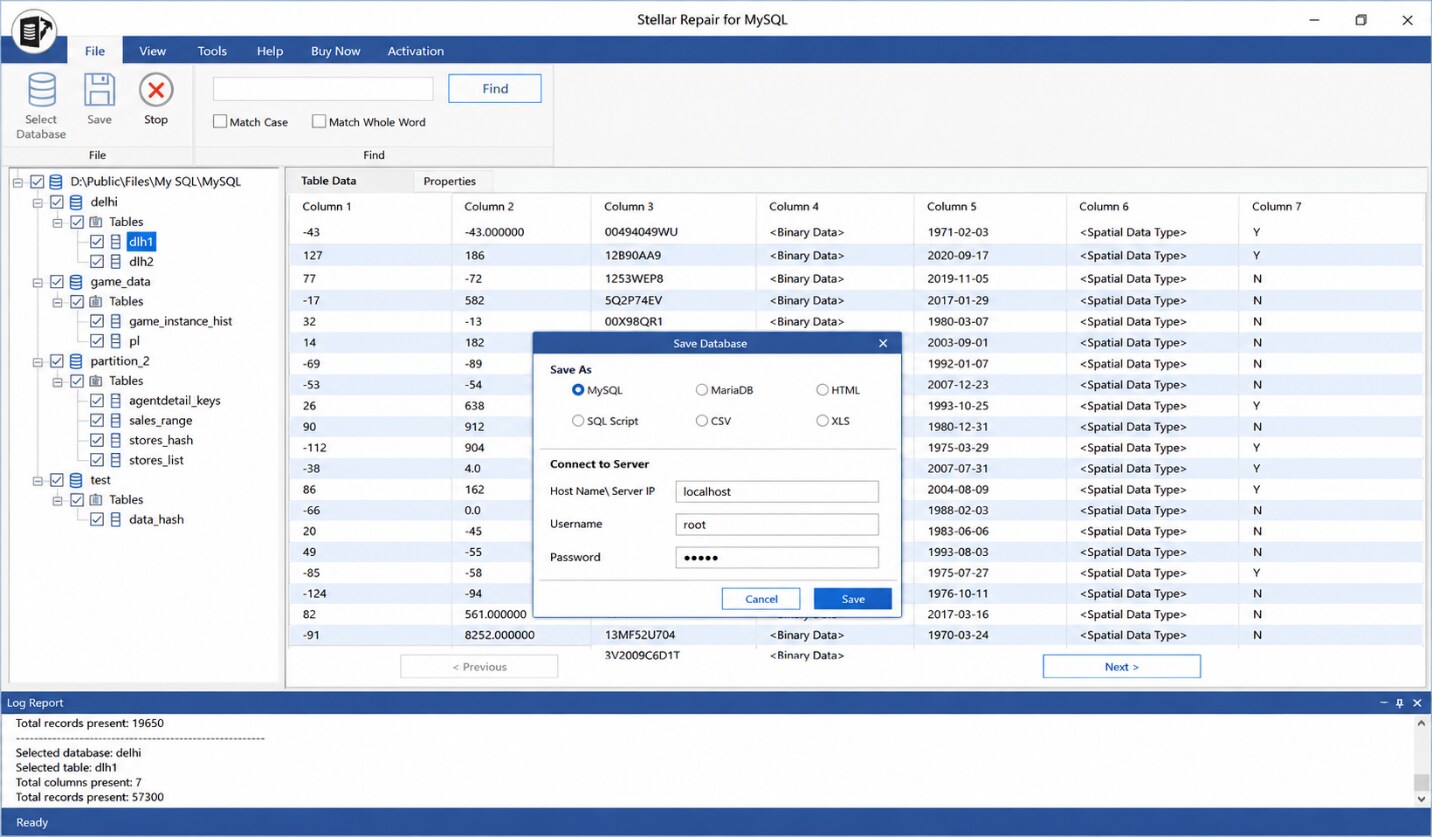
5. Export into a clean environment
The available destinations included an SQL script, a running MySQL or MariaDB instance, CSV, HTML and XLS. We chose an SQL script so that the statements could be reviewed before import. The script loaded into a clean database, and queries against the two recovered tables returned the expected records.
What we liked
- It handled both MyISAM and InnoDB files in one interface.
- The preview made it possible to inspect rows before export.
- It worked from copied physical files rather than requiring a healthy server connection.
- It recovered tables, indexes, views, triggers, stored procedures and relationships in our test.
- SQL export provided a reviewable route into a fresh database.
- Windows and Linux versions are available.
Limitations to consider
- Successful recovery depends on what was damaged and whether enough of the original files remain readable.
- A commercial licence may be needed to save a larger recovery. Check the current product page for the free allowance, prices and licence terms rather than relying on an older figure.
- Supported MySQL and MariaDB releases can change. Confirm your exact version before buying.
- The software does not replace tested backups, replication or a documented recovery plan.
Stellar Repair for MySQL versus native tools
| Question | Stellar Repair for MySQL | Native route |
|---|---|---|
| Storage engines | Works with MyISAM and InnoDB files through one interface | Different procedures are needed for each engine |
| Preview | Recovered rows can be inspected before export | Verification usually happens after a table opens or a dump completes |
| Export | SQL, server, CSV, HTML and XLS options | Usually a repaired MyISAM table or data extracted with mysqldump |
| Cost | Commercial limits may apply | Included with MySQL |
| Best use | A fallback when native extraction cannot read important tables | The first route to try on a copied dataset |
Verdict
Native recovery deserves the first attempt. myisamchk is the appropriate starting point for a damaged MyISAM table, while InnoDB’s own recovery and a cautious dump-and-reload procedure cover many shutdown incidents without extra software.
In our test, however, the two InnoDB tables remained unreadable to mysqldump. Stellar Repair for MySQL recovered those tables, showed the rows before export and produced an SQL script that imported cleanly. As an Online MySQL repair fallback for a failed native recovery, it did the job we needed. Keep expectations realistic, work from copies and verify the restored data before putting it back into production.
Last Updated: September 22, 2026