

An SPF record generator gives domain owners a quick way to create a valid Sender Policy Framework record. SPF is a component of email authentication for organizations that send mail through Google, Microsoft, EasySender, CRM systems, marketing platforms, help desks, or transactional email services.
The purpose of the record is to tell other mail servers which systems are allowed to send emails using your domain in the SMTP envelope sender address. Used with DKIM and DMARC, SPF helps protect against domain impersonation. It can support deliverability, although it cannot guarantee inbox placement or prevent every phishing message.
What an SPF record is and why it matters for email authentication
An SPF record is a TXT-based DNS record within your domain’s DNS zone. It specifies approved sending sources, including cloud email providers, third-party platforms and mail servers. Receiving mail servers use this information to check the sending IP against the domain in the SMTP MAIL FROM address, commonly called the envelope sender.
SPF can also check the HELO identity. It does not directly authenticate the visible From header.
Below is an example of a simple SPF record:
v=spf1 include:_spf.google.com include:spf.protection.outlook.com -allIn this case, we have authorized Google Workspace and Microsoft 365 infrastructure to send for the domain. A sender that does not match receives an SPF fail result. The receiving server decides what action to take next; a fail does not automatically mean rejection. Only include services that actually send on your behalf, and refer to each provider’s current setup instructions.
SPF in the authentication stack
SPF is one part of modern email authentication. A broader configuration may include:
- SPF to verify authorized sending sources.
- DKIM to cryptographically sign emails.
- DMARC to check alignment with the visible From domain and publish handling preferences and reporting settings.
- BIMI to support brand-logo display when the mailbox provider’s eligibility requirements are met.
- MTA-STS and TLS-RPT for transport security and reporting.
Tools such as EasyDMARC, MXToolbox and SuperTool provide diagnostics for these records. EasyDMARC also offers a DMARC Record Generator, DMARC checker, DKIM Record Generator, DKIM Checker, BIMI Record Generator, BIMI Checker, MTA-STS Record Generator and TLS-RPT Record Generator.
Configuring SPF correctly lets mailbox providers assess whether a sending server is authorized. Protecting the visible From domain requires DMARC with aligned SPF or DKIM. Delivery also relies on reputation, message content, recipient engagement and other checks.
Core mechanisms and qualifiers
SPF uses mechanisms to match senders. Modifiers supply additional processing instructions. Common terms include:
include:matches when the referenced domain’s SPF policy returns pass for the sender.redirect=delegates evaluation to another domain’s policy if no mechanism matches. It is a modifier; anallmechanism makes it ineffective.ip4:authorizes an IPv4 address or range.ip6:authorizes an IPv6 address or range.mxmatches addresses of hosts in the specified domain’s MX records.amatches the specified domain’s A or AAAA address records.exists:matches when its domain query returns an A record.
Qualifiers determine the SPF result when a mechanism matches. On the final all mechanism, these examples mean:
~allmeans softfail.-allmeans fail.?allmeans neutral.
An SPF record creator helps you put these terms together using the correct syntax. Check the result against the senders you actually use.
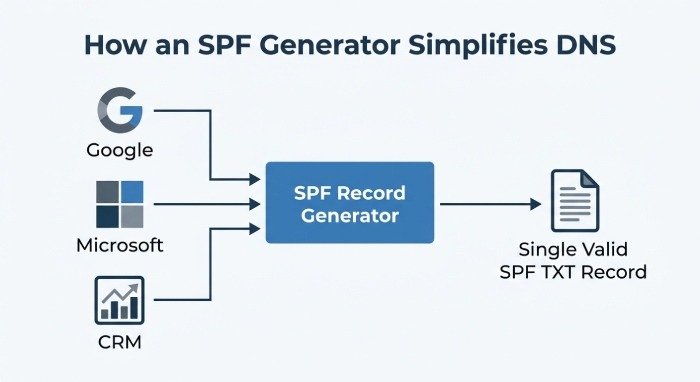
How an SPF record generator simplifies DNS setup
When you write SPF syntax manually, there is room for error. You might duplicate a record, misspell a mechanism or enter the wrong provider value. An SPF record generator assembles a TXT value from the email systems you choose and helps check its format.
AutoSPF, EasyDMARC and MXToolbox offer SPF record generators. These tools assist with the syntax, but you still need to identify legitimate senders and follow each provider’s instructions.
From source values to valid SPF records
An effective SPF record creator asks for your domain name, the senders you want to authorize and the policy you want to apply. Depending on the tool, you can add Google Workspace, Microsoft 365, bulk email providers, transactional senders, or custom IPv4 and IPv6 addresses.
The generator combines those values into one SPF TXT record. If your organization uses Google Workspace, Microsoft 365 and a marketing platform, enter the required values for those services. Some platforms send through their own envelope sender domain, however. Check whether they need any change to your domain’s SPF record.
Working with a combined record helps avoid publishing multiple SPF records for the same hostname, which causes a validation error. A generator also helps you check syntax before changing DNS. It cannot prevent a duplicate if you later publish its output as a second SPF record.
EasyDMARC provides related tools such as SPF Checker, SPF Raw Checker, Domain Scanner, Email Header Analyzer, Phishing Link Checker, Delivery Center, EasySPF and Alert Manager. Tools in this broader category can help with email health, verification, delivery testing, reputation monitoring and blocklist checks.
Step-by-step guide to creating an SPF record
To generate SPF record data, work through the sending systems first, then publish and test:
- Identify every sender. List all systems that send email for your domain: Google, Microsoft, CRM platforms, ticketing systems, newsletters, billing systems and transactional services.
- Open an SPF record generator. Use a tool such as AutoSPF, EasyDMARC’s SPF Record Generator or MXToolbox’s generator. SuperTool is useful for DNS lookups and diagnostics.
- Enter your domain name. The tool may detect your current SPF record and indicate whether you need to create, merge or modify it.
- Add authorized mechanisms. Enter provider-supplied
include:values and any requiredip4:orip6:addresses. Addaormxonly if the hosts they resolve to actually send your outbound mail. - Select the policy. Follow your email provider’s guidance. A
~allsoftfail policy is often used during rollout; consider-allonce legitimate senders are accounted for. Google Workspace recommends~all, while Microsoft 365 commonly uses-all. Avoid+all, which authorizes every sender.?allmakes no assertion about unmatched senders. - Check the generated record. Validate its syntax, formatting and DNS lookup count. MXToolbox, EasyDMARC and SuperTool can help identify problems before publication.
- Publish the DNS record. Add or update the TXT value at your DNS provider. Interfaces differ, but the result should be one SPF TXT record for the root domain or relevant subdomain.
- Verify results. Use DMARC reporting, a DMARC checker or a managed service to examine real-world authentication outcomes.
Example SPF record structure
A generated SPF record could resemble this:
v=spf1 include:_spf.google.com include:spf.protection.outlook.com ip4:198.51.100.25 ~allHere we have combined Google Workspace, Microsoft 365 and one IPv4 address. The address 198.51.100.25 is reserved for documentation. Replace it with your actual sending IP before publishing. Then check that the DNS record is visible, the lookup limit is respected and actual messages pass authentication.
Common SPF record mistakes and how to avoid them
Even experienced administrators make mistakes when configuring SPF. Because it relies on DNS, one incorrect record can affect authentication for mail sent from the domain.
Frequent errors that hurt deliverability
These problems are worth checking before and after publication:
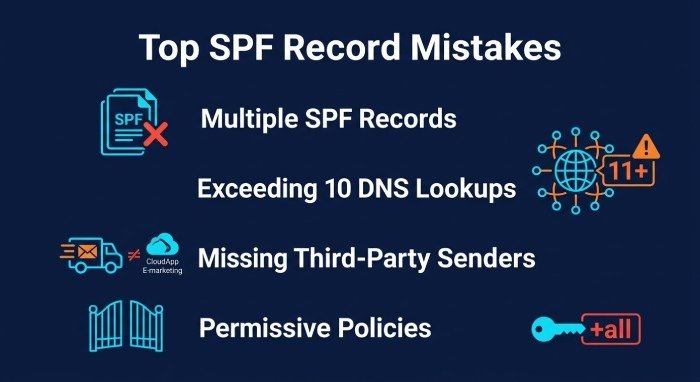
- Multiple SPF records for one hostname. Only one SPF TXT record is permitted for a given hostname. Publishing more than one returns an SPF permanent error, or
permerror. - Too many DNS lookups. SPF limits evaluated DNS-querying terms to 10, including terms in nested policies. These include
include,a,mx,existsand theredirectmodifier. Exceeding that limit returnspermerror. Theip4,ip6andallmechanisms do not count toward it. - Missing third-party senders. Legitimate mail may fail an SPF record check if a CRM or newsletter service is missing from the relevant policy.
- Overly permissive policies.
+allauthorizes every sender.?allmakes no authorization judgment for unmatched senders. - Rushed manual edits. An edit can remove a needed provider or introduce invalid syntax.
- No check after a DNS change. Run an SPF checker after an update to confirm the record is live and correctly formatted.
Whenever you add or remove a sender, update the existing SPF record and run a fresh check. Remove obsolete entries before attempting more complicated changes. Flattening replaces provider references with IP addresses, which need ongoing updates when providers change their infrastructure. A static flattened record can become stale.
Resources such as Academy EasyDMARC, Industry Research, Case Studies and Expert Insights, along with G2 and SourceForge reviews, can help teams compare tools. MSP Pipeline resources may also help managed service providers standardize SPF, DKIM and DMARC deployment across client domains.
Testing, updating, and maintaining your SPF record
Once you have implemented SPF, the job is not finished. Adding a marketing tool, migrating to Microsoft 365, adopting Google Workspace, switching support platforms or introducing a transactional sender can change your requirements.
Run another SPF record check whenever you change mail systems. Confirm that the record still matches actual sending behavior. If necessary, make adjustments using an SPF record generator rather than guessing at the syntax.
Ongoing maintenance can include:
- Monthly email health reviews.
- SPF and DKIM authentication checks, including alignment for DMARC.
- Verification of sending domains and subdomains.
- Regular deliverability test campaigns.
- Reputation and blocklist monitoring.
- Authentication diagnostics after provider changes.
- Alerts through an Alert Manager or similar monitoring system.
EasyDMARC’s Delivery Center, Domain Scanner, Email Header Analyzer, SPF Checker, SPF Raw Checker and Alert Manager can help support this work. Some platforms also provide an embed widget for agencies or service providers offering SPF diagnostics to clients.
For stronger domain protection, set up DKIM through your sending provider, publish an appropriate DMARC policy and verify alignment. A DKIM record generator alone does not make a mail server sign messages. Consider BIMI once its authentication and mailbox-provider requirements are met.
Use your SPF record generator to assemble the syntax, publish one SPF TXT record and validate it with an SPF checker. Keep that record up to date as your sending sources change. This supports email security and deliverability while giving you a policy you can inspect and maintain.
Last Updated: September 14, 2026