
In manufacturing environments, a clear diagram can often do more than a long technical document. It helps teams see how cameras, circuits, devices, networks, and workflows fit together, making planning, maintenance, and cross-team communication far easier.
Wondershare EdrawMax stands out as one of the most practical diagramming tools for creating manufacturing diagrams because it provides professional templates, technical symbols, precision tools, drag-and-drop editing, presentation mode, Visio compatibility, and multiple export formats in one visual workspace.
Below are three common types of manufacturing diagrams and how Wondershare EdrawMax can help users create them more efficiently.
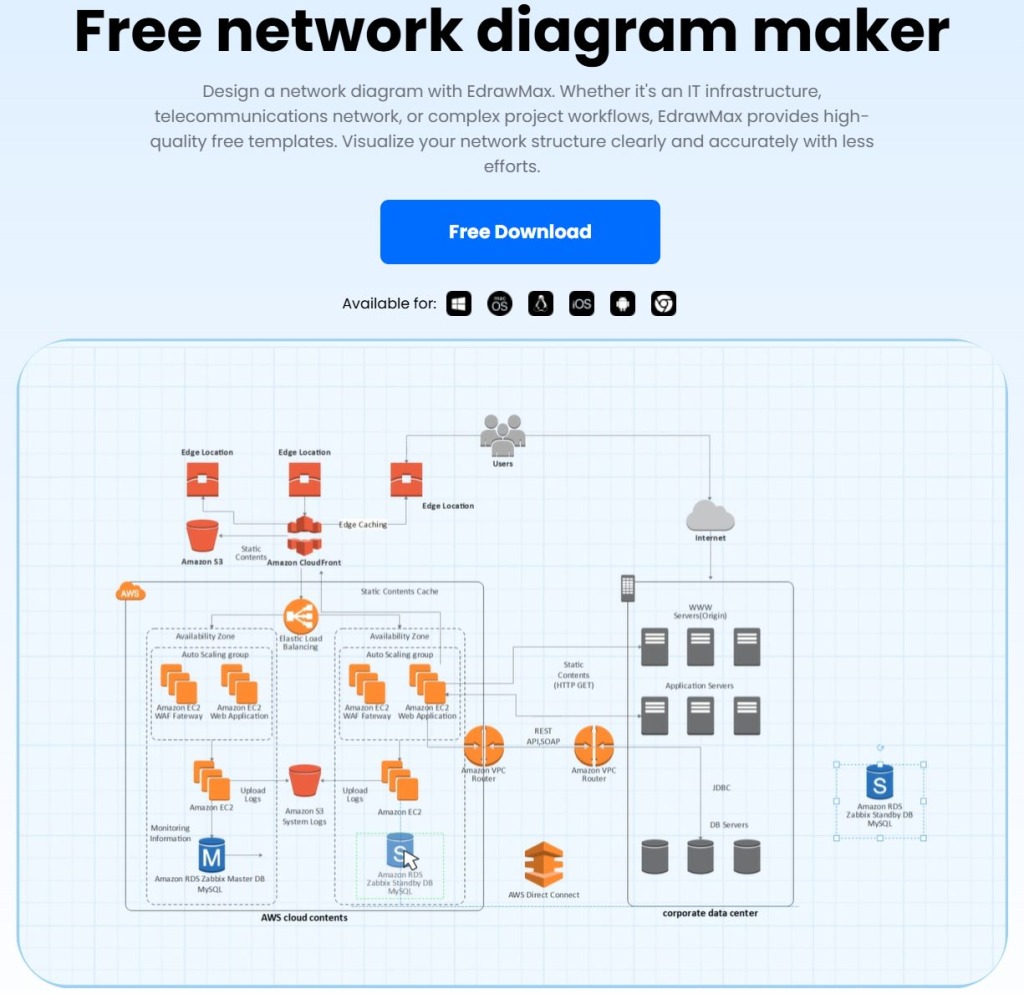
Scenario 1: How to Create Network Diagrams for IT and Industrial Infrastructure
Quick Answer
For IT infrastructure, telecommunications, and industrial network planning, Wondershare EdrawMax helps users create network diagrams with ready-made templates, Visio import and export, an Office-style interface, cross-device access, online collaboration, and 10+ export formats. Users can visualize Cisco networks, WAN structures, firewall layouts, cloud networks, and complex project workflows more clearly.
Common Challenges
Manufacturing and IT teams often need to:
- document IT infrastructure across facilities and departments
- visualize telecommunications networks and device relationships
- map WAN, firewall, Cisco, AWS, or Azure network structures
- update network plans across desktop, mobile, or online environments
- share diagrams in formats suitable for reports, presentations, and documentation
How Wondershare EdrawMax Helps with Network Diagrams
- Network diagram template library: Templates for Cisco diagrams, logical network diagrams, WAN diagrams, firewall diagrams, AWS diagrams, Azure diagrams, and other network structures.
- Visio alternative support: A more user-friendly Visio alternative with import and export support for smoother file transition.
- Office-style interface: A familiar and clean interface that makes network diagram creation, editing, and refinement easier for technical and non-technical users.
- Cross-device access: Diagram creation and editing across desktop, laptop, mobile, and online environments.
- Online collaboration support: Team access without requiring every collaborator to download EdrawMax.
- 10+ export formats: Export to PDF, SVG, image formats, and other file types for professional reports, scalable graphics, presentations, and documentation.
Scenario 2: How to Create CCTV Network Diagrams for Facility Security
Quick Answer
For facility security planning, Wondershare EdrawMax helps users create CCTV network diagrams with professional templates, detailed network symbols, precision scaling tools, presentation mode, and multi-format export options. Users can design analog, IP, wireless, and hybrid CCTV network layouts to show camera positions, servers, connections, and monitoring structures more clearly.
Common Challenges
Manufacturing and facility teams often need to:
- plan camera placement across buildings or production areas
- show how CCTV devices connect to servers or control rooms
- visualize analog, IP, wireless, or hybrid surveillance systems
- scale network layouts accurately for installation planning
- present CCTV plans to security, IT, and operations teams
How Wondershare EdrawMax Helps with CCTV Network Diagrams
- Professional CCTV network templates: Template resources from the EdrawMax community for analog systems, IP systems, wireless CCTV networks, and hybrid surveillance layouts.
- Detailed network symbol library: 26,000+ shapes for depicting CCTV components, interior details, servers, devices, and facility-related elements.
- Precision scaling tools: Dimension lines and precision tools for creating more accurate CCTV network layouts and installation-ready diagrams.
- Presentation mode: Slideshow generation from selected areas of a network diagram for team discussions, security reviews, or project presentations.
- Multi-format export support: Export options across PPT, Visio, PNG, JPG, and other formats for easier sharing, documentation, and collaboration.
- Non-EdrawMax sharing: Diagram sharing with users who do not have EdrawMax, including social media and common file-based delivery options.
Scenario 3: How to Create Electrical Design Diagrams for Manufacturing Systems
Quick Answer
For electrical planning and maintenance, Wondershare EdrawMax helps users create electrical design diagrams with built-in and user-generated templates, 26,000+ vector-enabled symbols, drag-and-drop editing, infinite canvas, AI assistance, import support, and multiple export formats. Users can visualize circuits, control systems, communication setups, robots, and digital electrical systems with less manual drawing.
Common Challenges
Manufacturing teams often need to:
- map electrical connections across machines and systems
- document circuits, control systems, and communication setups
- create diagrams that are accurate enough for review and maintenance
- reuse common electrical symbols across repeated projects
- share electrical designs with engineers, technicians, and external partners
How Wondershare EdrawMax Helps with Electrical Design Diagrams
- User-generated and built-in templates: 20,000+ templates, including electric diagrams for robots, control systems, communication setups, circuit design, and digital circuits.
- Vector-enabled electrical symbols: 26,000+ professionally crafted symbols covering electrical, maintenance, maps, analog logic, and digital repair use cases.
- Personalized symbol libraries: Custom library creation for frequently used electrical components and repetitive design tasks.
- Drag-and-drop diagram creation: Easy placement and arrangement of symbols for users with different levels of design experience.
- Infinite canvas support: Flexible space for mapping large or complex electrical systems without layout limitations.
- AI assistance and learning resources: AI-supported diagram creation, documented user guides, and video tutorials for both beginners and experienced users.
- Import and export compatibility: Export to Visio, PNG, JPG, PDF, MS Office, and other formats, with import support for SVG, Visio, and CAD files.
Final Thoughts
In 2026, the best way to create manufacturing diagrams is not to rely on scattered sketches or static technical documents, but to use a visual tool that combines accuracy, scalability, and efficient collaboration. CCTV network diagrams, electrical design diagrams, and network diagrams all require clear symbols, precise connections, editable layouts, and flexible sharing options.
Wondershare EdrawMax brings templates, technical symbols, precision tools, Visio compatibility, presentation mode, cross-platform access, and multi-format export options into one workspace, helping engineering, maintenance, IT, facility, and operations teams turn complex industrial systems into clear, organized, and shareable technical diagrams.
Last Updated: May 25, 2026