Most “AI video apps” make clips; only a few make a music video. For a complete video from a song, the best AI music video generator app going into 2027 is Neural Frames, a browser app that analyses the track, keeps up to five characters consistent, exports 4K and posts the vertical cuts to TikTok, Instagram and YouTube. Freebeat is a lower-cost option with a phone app. Runway, Kling and Pika are useful for individual clips you can assemble in an editor such as CapCut. Kaiber also offers beat-synced montage workflows.
Clip apps and music video apps are different things
An application that creates a short video (a few seconds) from user input is called a “clip” app. An application that takes the full song, analyses its structure and provides a complete video based on this analysis is called a “music video” app.
The main difference here is what form of output you receive from each type of app. A clip app will give you the basic building blocks to create your own project. A music video app will give you a complete sequence to review before publishing or distributing.
This differentiates the amount of effort required once each app has completed its part of the process. After using a music video app, the next task would typically include the review of a storyboard. Using a clip app, the next steps could be spending many hours in an editor placing dozens of individual clips into a timeline along with the beat.
The comparison
|
# |
App |
Best for |
Platform |
Takes a song as input |
Full-song video |
Consistent character |
Lip-sync |
Max export |
Free option |
Price from |
|---|---|---|---|---|---|---|---|---|---|---|
|
1 |
Neural Frames |
Complete music videos plus social cuts |
Web, including mobile browsers |
Yes, 8-stem analysis |
Yes |
Yes, up to 5, reusable |
Yes |
4K |
Yes |
$26/mo billed annually ($39 monthly) |
|
2 |
Freebeat | Budget avatar and song videos |
Web and mobile |
Yes |
Yes, to about 6 min |
Yes |
Yes | Plan listings: 720p or 1080p |
Yes | $4.99/week promotional offer |
|
3 |
Kaiber |
Stylised animation to a beat | Web, including mobile browser |
Beat Sync on Creator and above | Music Video Montage; check duration |
Not stated | Character lip-sync workflow |
Not stated |
$5 five-day trial |
$10/mo; $8/mo billed annually |
|
4 |
Runway |
Cinematic clips |
Web and mobile | Clip workflow; separate audio tools |
No |
Not stated |
Not stated |
4K via upscale |
125 one-time credits |
$12/mo billed annually |
|
5 |
Kling AI |
Realistic motion clips |
Web and mobile | Singing audio for lip-sync |
No, up to 30 s |
Yes |
Yes | Model and access dependent |
Limited credits |
Priced in-app |
|
6 |
Pika |
Effects and short social clips |
Web | Clip workflow; separate audio tools |
No |
Not stated |
Not stated |
Not stated |
$0 plan, no monthly credits |
$10/mo; $8/mo billed annually |
|
7 |
CapCut |
Editing the clips together |
Mobile and desktop | Yes, for editing; AI tools vary | Manual edit; AI features vary by region |
Manual | Performance tools vary by workflow |
Varies by plan |
Yes |
Free; Pro tier on capcut.com |
1. Neural Frames: best overall
Best for: musicians who want the full release package — a music video, lyric video and short-form clips — from one song upload.
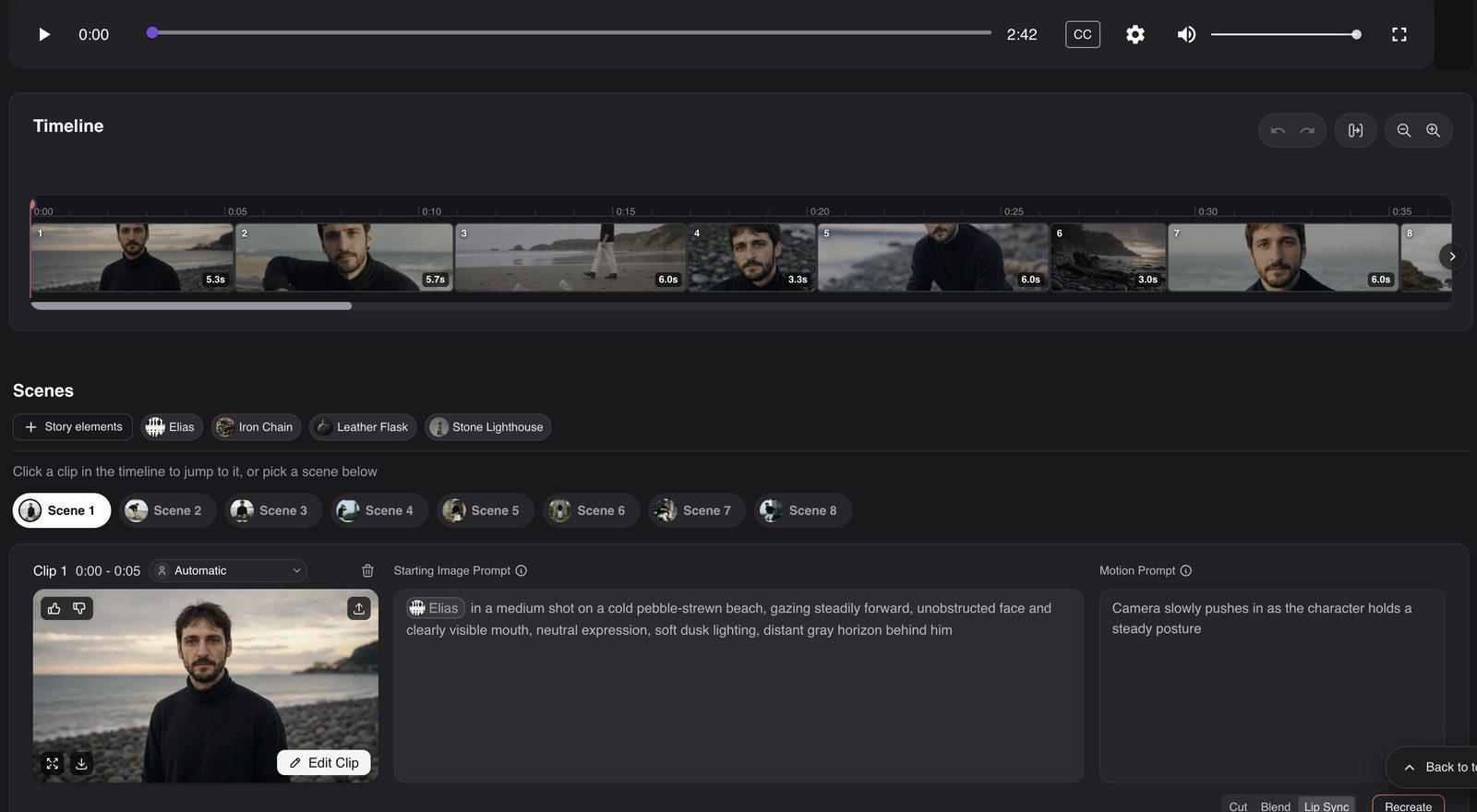
What it does: Uploads your song in the browser and Autopilot breaks down the song into 8 individual stems, identifies the structure of the song and creates a completed beat-cut video. You can accept the initial result or direct scenes through a chat-based editor, with access to prompts and clip timing. Up to five characters can be kept consistent throughout the entire video, and are also carried forward in subsequent video projects.
The artist can reference any pre-existing character work or visual style, and can create additional content using these references. Neural Frames offers access to video models such as Seedance and Kling depending on the chosen plan and workflow. Additionally, lip-sync and lyric video tools are built into the platform.
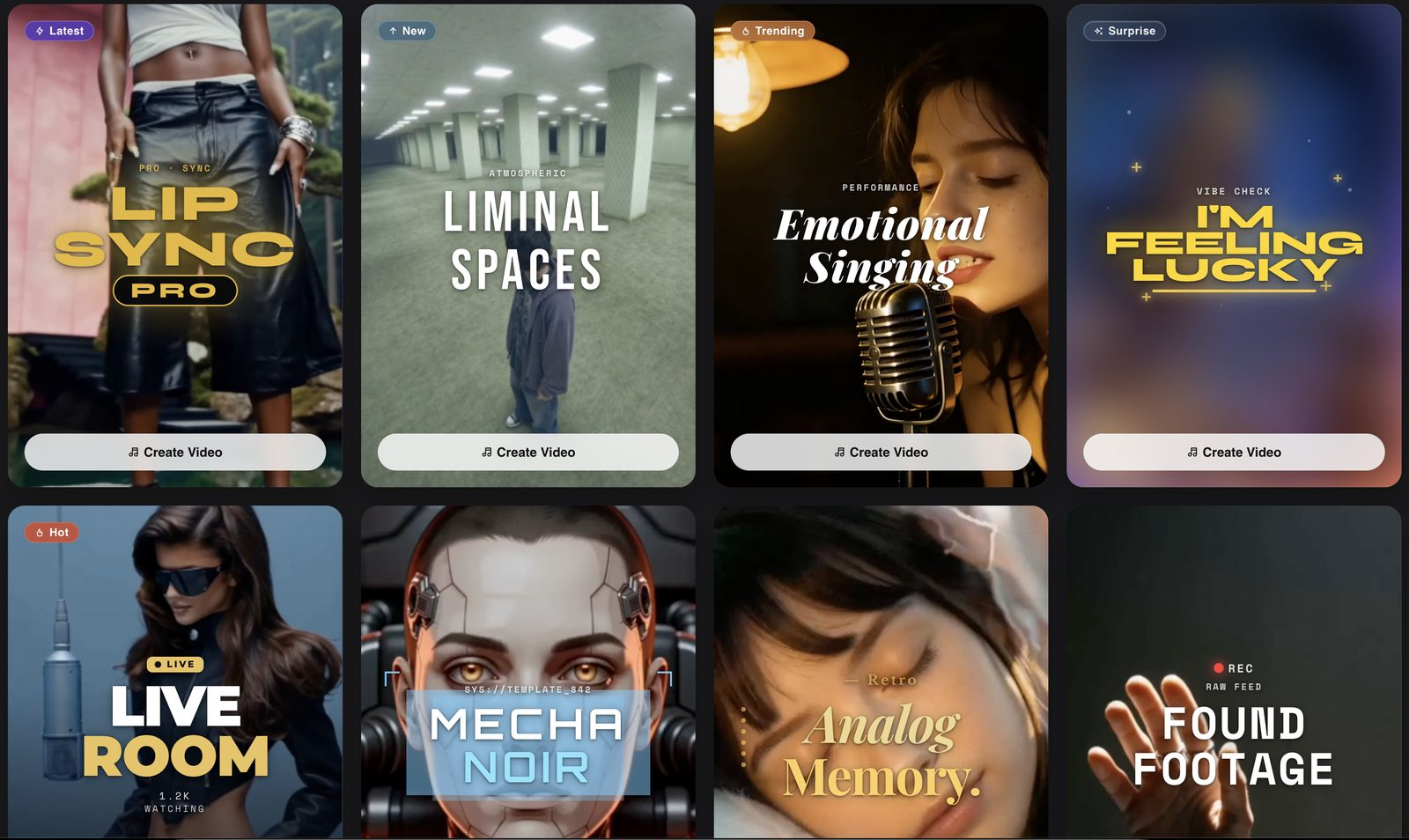
Short-Form Studio is designed for social clips for TikTok, Instagram Reels and YouTube Shorts. Its template library provides starting points for vertical videos made from the same song, so the full-length video and shorter promotional clips can be developed within the platform.
Pricing: there is a free option. Neural Knight costs either $26 per month (billed annually) or $39 each month for 2,400 credits. Neural Ninja costs $66 per month billed annually or $99 on monthly billing, with 7,200 credits and 4K upscaling. Neural Nirvana is $199 per month billed annually or $299 on monthly billing. Credits roll over while the subscription remains active, up to three months’ worth. Failed generations do not cost credits, and you retain rights to your videos, subject to rights in any material you upload.
Limits: it runs in the browser. Neural Knight includes 1080p upscaling; 4K upscaling requires Neural Ninja or Neural Nirvana.
2. Freebeat: a budget option with a phone app
Best for: An avatar or music video of up to six minutes created on a mobile device.
What it does: Music, Dance, Lyric & Karaoke options that are synced with your avatars and lip movement using either a link or upload of your desired song.
Pricing: There is a free version available. According to their pricing page the Basic plan is currently offered at $4.99/week and the Pro plan at $26.99/month. Please be sure to check the renewal price prior to checkout as both their homepage examples and current plan listings vary.
Limits: According to their pricing pages, the Basic plan will produce videos in 720p while the Pro plan also produces videos in 720p, but the Ultimate plan and the Creator plan produce 1080p video quality. Be sure to review the model you have chosen and/or plan you select prior to payment if the specific video output quality is important to you.
3. Kaiber: stylised animation
Best for: painterly or morphing visuals that move with the music.
What it does: a platform to create video and images using artificial intelligence (AI) with an editor and canvas; also has Beat Sync capability.
Pricing: Kaiber’s plan guide lists a $5 five-day trial and Starter at $10 a month, or $8 a month on an annual plan. Beat Sync requires Creator or above; the trial converts to Creator Monthly after five days unless cancelled.
Limits: Beat Sync is not included on Starter. There are mobile-browser workflows in Kaiber, such as Music Video Montage and character lip-sync. Please review your selected workflow’s duration, export resolution, and watermark terms before committing to subscriptions.
4. Runway: cinematic clips
Best for: creating individual cinematic shots to later edit together in a longer video.
What it does: a general video model (Gen-4.5) that generates clips from images or text with the ability to upscale to 4K.
Pricing: Runway’s pricing page lists 125 one-time free credits and Standard at $12 a month billed annually, with 625 monthly credits. Gen-4.5 uses 60 credits for five seconds, so leave room for retries when budgeting a full video.
Limits: this comparison only covers its clip generation workflow. Runway does have audio tools, but generating a shot is different than automatically directing and assembling a complete video around an uploaded song.
5. Kling AI: realistic motion
Best for: convincing human movement and dance in short clips.
What it does: this is a general video model that has character models and Lip Sync options to produce videos no longer than 30 seconds using Kling 4.0.
Pricing: free credits are available but very limited. Memberships can be purchased through the app.
Limits: Kling allows you to add your own singing tracks into its Lip Sync option. It is quite different from being able to take a full-length song, then have Kling create an entire synchronised music video; you will need to put together the long-form version by assembling multiple shorter versions.
6. Pika: effects and short clips
Best for: quick, playful effects for social.
What it does: text, image and video generation with an effects library.
Pricing: a $0 plan with no monthly credits (credit packs only); Starter is $10 per month, or $8 per month billed annually, with 900 credits.
Limits: the free plan has no commercial licence. Pika also offers audio tools, but a complete music video still needs a planned sequence and editing; do not confuse generating music with making visuals for an existing song.
7. CapCut: the editor
Best for: making clip-by-clip cuts directly into your track using the other mentioned apps.
What it does: An editor with a free version for both mobile and desktop that has template options as well as auto-captioning and video effects.
Pricing: there is a free version and a paid Pro tier. Check current regional pricing before subscribing.
Limits: Some regions have restrictions on certain of the AI-based workflows that are advertised by CapCut (for example, AI music-video or performance). While it can be an excellent tool for placing your individual video clips together, make sure you look up which of the AI workflows are enabled within your specific account before you expect this app to create a full song-to-video.
FAQ
What is the best app to make a music video with AI?
Neural Frames is the pick for a complete video from a song in the browser. Freebeat is a lower-cost option for making a video on a phone, with weekly plans available.
Is there an AI music video generator for iPhone?
Freebeat, Runway and Kling have mobile apps. Neural Frames works in a mobile browser, so there is nothing to install.
Can these apps make a full video, or just clips?
Neural Frames and Freebeat use a full song to generate a complete video. Runway, Kling and Pika are also useful for individual clips, which you can assemble in an editor such as CapCut. Kaiber has beat-synced montage workflows too; check the selected workflow’s duration.
Which AI music video app is free?
All three of Neural Frames, Freebeat and Kling offer free versions. Runway offers 125 one-time free credits. Pika also has a free version ($0), but the free version does not include any monthly credits, and CapCut is free, but has a Pro version available for purchase.
Last Updated: October 27, 2026