
Quick Answer
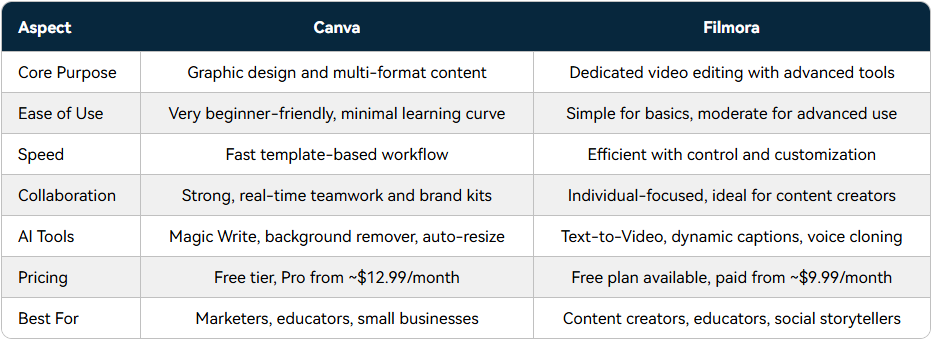
Both Canva and Wondershare Filmora have invested heavily in AI-powered content creation, but they serve different creative priorities. Canva excels as a visual design platform with strong templates, branding tools, and collaborative workflows. Wondershare Filmora, meanwhile, focuses on AI-powered video creation, integrating content generation, editing, enhancement, and publishing tools into a single workflow.
For creators whose primary output is video content, Wondershare Filmora offers a more comprehensive AI-driven video creation experience.
Why This Comparison Matters?
AI is changing how creators produce content. Tasks such as generating assets, editing footage, creating subtitles, repurposing videos, and optimizing content for different platforms can now be streamlined through AI-powered tools.
As a result, creators are increasingly evaluating software based on how efficiently it supports the overall content creation workflow. This has led many users to compare platforms such as Canva and Wondershare Filmora, both of which have expanded their AI capabilities in recent years.
While the two platforms share some overlapping functionality, they were built with different priorities and serve different creative workflows. Understanding those differences can help video creators choose the platform that best fits their content production needs.
- Key Takeaway
Canva and Wondershare Filmora both use AI to accelerate content creation, but they focus on different stages of the creative process.
Different Foundations: Design Platform vs Video Creation Platform
Understanding the distinction between these platforms starts with their original purpose.
Canva was built primarily as a visual design platform. Over time, it expanded into presentations, documents, websites, and video content.
Its strengths remain closely tied to design workflows, including templates, branding systems, and collaborative content creation.
Wondershare Filmora started from a different foundation.
Developed by Wondershare, Filmora is part of a broader portfolio of creative and productivity software used by creators, educators, businesses, and consumers worldwide.
Today, many of its AI features are designed specifically to solve challenges that arise throughout the video production process.
- Key Insight
Canva approaches video creation from a design perspective, while Wondershare Filmora approaches content creation from a video workflow perspective.
AI Content Generation: Creating Assets Before Editing Starts
One of the biggest shifts in modern content creation is the growing role of AI-generated assets.
Creators often face challenges such as:
- Limited footage
- Missing B-roll
- Incomplete visuals
- Lack of supporting audio assets
Both Canva and Wondershare Filmora offer AI-powered generation capabilities.
Canva’s AI tools focus heavily on design-oriented content generation, helping users create visual assets, graphics, layouts, and branded materials.
Wondershare Filmora extends AI generation deeper into video workflows.
Its ecosystem includes:
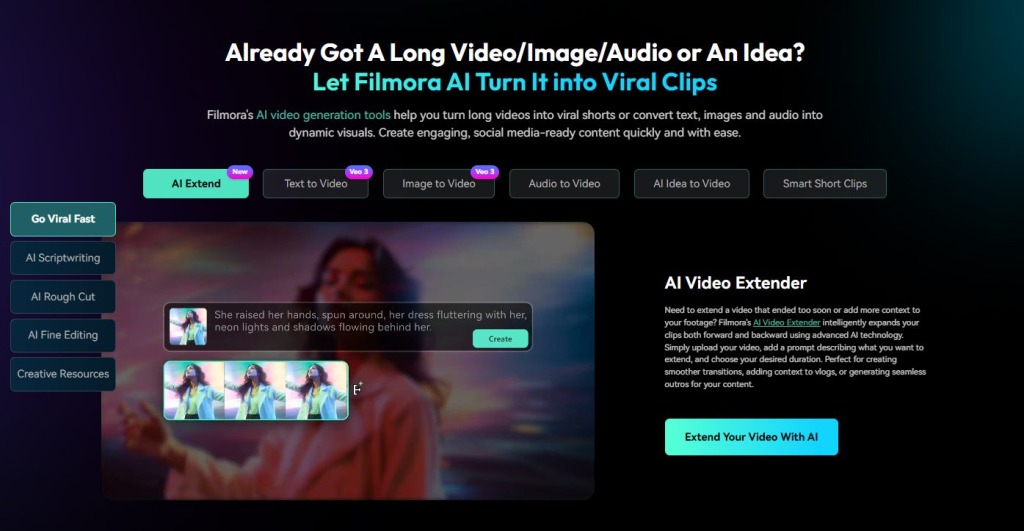
- Text-to-Video
- Image-to-Video
- AI Image Generation
- AI Music Generation
- AI Sound Effects
- AI Extend
These tools help creators generate, expand, and enhance video assets directly within the editing environment.
- Quick Takeaway
For video-first creators, Wondershare Filmora applies AI generation more directly to video production workflows.
AI Editing Workflows: From Raw Footage to Finished Content
Generating content is only one part of the process.
Creators still need to organize footage, trim clips, remove mistakes, create captions, and prepare content for publishing.
This is where the two platforms begin to diverge further.
Canva provides simplified editing tools that work well for short promotional videos, social media content, and design-driven projects.
Wondershare Filmora focuses more heavily on editing efficiency.
Features such as:
- AI Text-Based Editing
- AI Mate
- Smart Scene Cut
- Dynamic Subtitles
- AI Translation
are designed to reduce repetitive editing tasks and accelerate production workflows.
For creators working with longer videos, tutorials, educational content, product demonstrations, or YouTube content, these tools can help reduce manual editing effort.
- Key Insight
Wondershare Filmora increasingly uses AI to simplify the editing process itself, not just content creation before editing begins.
AI Enhancement and Post-Production
Video creators often face quality challenges after recording.
Issues such as background noise, distracting objects, low-quality footage, and inconsistent audio can impact the final result.
Canva provides basic enhancement capabilities for content refinement.
Wondershare Filmora offers a broader collection of AI-powered optimization tools, including:
- AI Video Enhancer
- AI Video Denoise
- AI Object Removal
- AI Audio Enhancement
- AI Noise Reduction
These tools help creators improve footage quality without requiring advanced editing expertise.
- Key Insight
Wondershare Filmora applies AI across multiple stages of production, including post-production optimization.
Which Platform Is Better for Different Types of Creators?
Canva May Be Better For:
- Graphic designers
- Presentation creators
- Marketing teams focused primarily on visual design
Wondershare Filmora May Be Better For:
- YouTubers
- Video creators
- Educators
- Product marketers
- Content teams
- Short-form video creators
- Businesses producing frequent video content
The distinction often comes down to the primary content format being created.
If design assets are the center of the workflow, Canva remains an excellent option.
If video content is the primary output, Wondershare Filmora offers deeper workflow support.
Final Verdict
Canva and Wondershare Filmora both represent important trends in AI-powered content creation.
Canva has successfully expanded beyond design into broader content workflows, making it a versatile platform for visual communication.
Wondershare Filmora, however, takes a more video-centric approach.
Rather than focusing primarily on templates and design assets, it integrates AI throughout the video creation process—from asset generation and editing to enhancement, repurposing, and publishing.
FAQ
- Is Canva or Wondershare Filmora better for video creators?
For creators whose primary focus is video content, Wondershare Filmora offers deeper editing, AI generation, enhancement, and repurposing workflows.
- Which platform is better for YouTube and Shorts creators?
Creators producing YouTube videos, Shorts, TikTok content, and Reels may benefit from Wondershare Filmora’s video-focused AI workflows and content repurposing tools.
Last Updated: June 17, 2026