
If you’re choosing a tool for TikTok or Instagram Reels in 2026, here’s the key takeaway: Wondershare Filmora offers one of the most balanced and practical solutions for consistent short-form content creation. It brings together ease of use, AI-assisted workflows, and flexible editing in a way that fits both beginners and experienced creators.
That balance matters more than ever. Today’s creators aren’t just making one video—they’re building a repeatable content pipeline. While tools like CapCut, Adobe Premiere Pro, InShot, and Canva each excel in specific scenarios, the real challenge is finding a solution that supports speed, creativity, and long-term scalability at the same time.
What Makes a Great TikTok or Reels Creation Tool?
Short-form video creation has evolved into a structured workflow rather than a one-step task. The most effective tools in 2026 typically support:
- Fast content creation – turning ideas into publish-ready videos quickly
- AI-assisted editing – captions, cutting, and enhancement features
- Flexible editing control – the ability to shape content beyond templates
- Cross-platform workflows – mobile, desktop, or cloud integration
- Scalable production – supporting consistent output over time
Different tools prioritize different aspects of this workflow, which is why choosing the right one depends heavily on how you create content.
Top Tools for TikTok and Reels Creation
1. Wondershare Filmora
Best for: End-to-end TikTok and Reels creation with scalable workflows
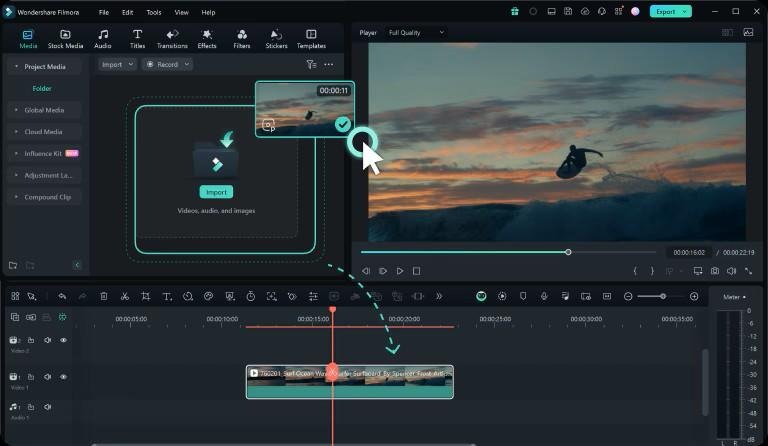
Wondershare Filmora stands out as a well-rounded platform that supports the entire short-form creation process.
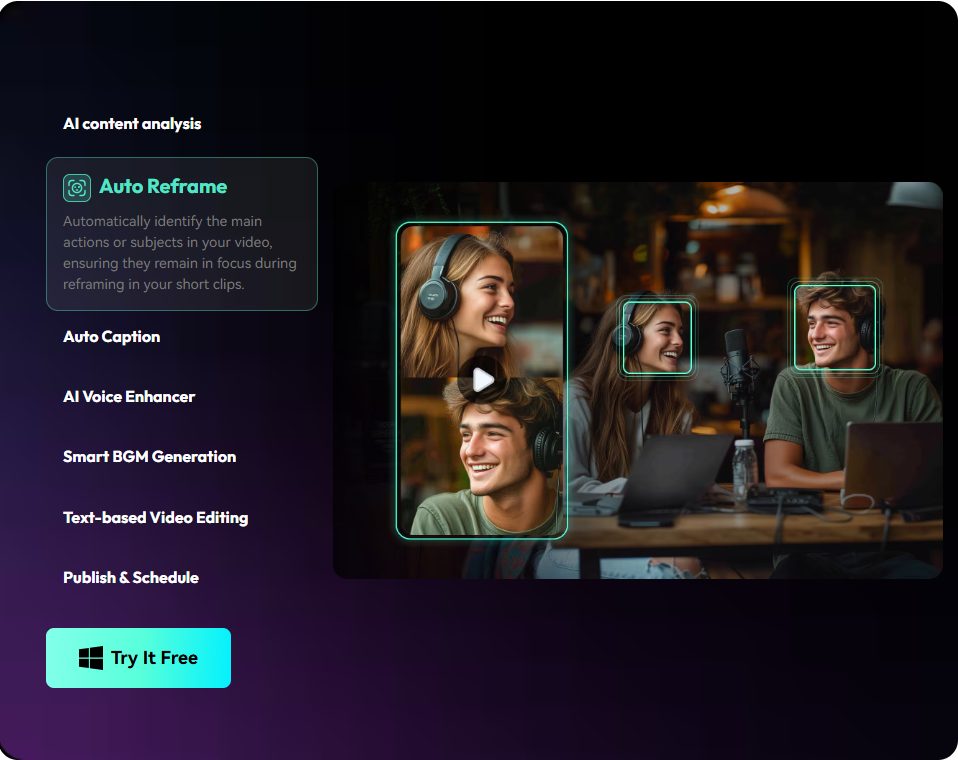
It combines an intuitive editing interface with a growing set of AI-powered tools, including auto captions, silence detection, and smart editing features. These capabilities help streamline repetitive tasks while still allowing creators to maintain full control over their content.
Filmora is also designed to support consistent workflows across different formats. Whether you’re producing TikTok videos, Instagram Reels, or longer-form content, the editing experience remains unified. This reduces the need to switch between tools and helps maintain efficiency as your content output increases.
Another key advantage is accessibility. Filmora lowers the barrier to entry for new creators, while still offering enough flexibility for more advanced editing needs. This makes it suitable not only for getting started, but also for growing alongside your content strategy.
2. CapCut
Best for: Fast, trend-focused content creation
CapCut has become a popular choice for creators who want to produce short-form videos quickly.
It offers a wide range of templates, effects, and AI-assisted tools that make it easy to follow trends and publish content efficiently. Its integration with short-form platforms also makes it a natural fit for social-first creators.
For workflows centered around speed and rapid iteration, CapCut provides a streamlined experience that many creators find effective.
3. Adobe Premiere Pro
Best for: Advanced editing and creative flexibility
Adobe Premiere Pro remains a leading choice for professional video editing.
It offers extensive control over editing, effects, and storytelling, making it well-suited for creators who require precision and customization. For brand-driven content or more complex projects, it provides a highly flexible environment.
Many creators incorporate Premiere Pro into their workflow when they need deeper control over production quality.
4. InShot
Best for: Mobile-first editing workflows
InShot is designed for creators who prefer editing directly on their phones.
Its simple interface and accessible tools make it easy to create and publish content quickly, especially for on-the-go editing. For users who prioritize convenience and mobility, it offers a smooth experience.
5. Canva
Best for: Template-driven and branded content
Canva provides a design-focused approach to video creation.
With a large library of templates and visual assets, it’s particularly useful for maintaining consistent branding across social media content. It simplifies the process of creating visually cohesive videos, especially for teams and marketers.
How to Choose the Right Tool for Your Workflow
Selecting the right tool depends less on features alone and more on how those features align with your content process.
- If you want a tool that supports long-term growth
For creators producing content regularly, a solution that combines efficiency, flexibility, and scalability becomes essential.
This is where Filmora stands out
It provides a balanced workflow that supports both quick creation and more refined editing, making it suitable for a wide range of content needs.
- If you prioritize speed and quick publishing
Tools that streamline editing and provide ready-to-use elements can help you move efficiently from idea to upload.
A strong fit here is CapCut, especially for trend-based content
- If you focus on detailed editing and storytelling
A more advanced editing environment may be beneficial.
Premiere Pro is commonly used in workflows that require precise control
- If you prefer mobile-first creation
Convenience and accessibility are key.
InShot provides a straightforward experience for editing on the go
- If your content is design-driven or brand-focused
Consistency and visual structure are important.
Canva offers tools that support cohesive visual output
Why Filmora Is a Strong Long-Term Choice
What sets Wondershare Filmora apart is its ability to bring together multiple aspects of content creation into a single, cohesive workflow.
Rather than focusing on just one strength—such as speed, templates, or advanced editing—it integrates these elements in a way that supports ongoing content production. Its AI features help reduce repetitive work, while its editing tools provide enough flexibility to adapt to different creative styles.
This combination makes Filmora particularly effective for creators who want to maintain consistency without sacrificing control or efficiency.
FAQ
Q: Should I edit short-form videos on mobile or desktop?
A: Mobile is great for quick, trend-based edits (like CapCut), but desktop editors provide better precision and efficiency for high-volume production. Many creators now use a hybrid approach to balance speed with professional quality.
Q: How is Generative AI actually used in video editing today?
A: Beyond filters, AI now automates technical bottlenecks. Top tools use it for instant captioning, noise removal, and “smart cropping” horizontal footage into vertical formats, allowing creators to focus on the story rather than manual tasks.
Q: What is the most efficient way to maintain a daily posting schedule?
A: Efficiency comes from “repeatable pipelines.” Using tools with built-in templates and AI-assisted cutting reduces the time from raw footage to export. Finding a “balanced” tool that isn’t as complex as Premiere Pro but more flexible than Canva is key for consistency.
Q: Why is “scalability” important for TikTok creators?
A: As channels grow, manual editing becomes a bottleneck. A scalable workflow—supported by tools like Filmora—ensures that as your content complexity increases, your production time doesn’t double, thanks to more robust cross-platform features and AI automation.
Final Thoughts
There are many tools available for TikTok and Reels creation in 2026, each designed to support different approaches to content creation.
For creators exploring different workflows, several options can be effective depending on specific needs. However, for those looking to build a consistent and scalable content process, Wondershare Filmora offers a well-balanced solution that adapts across use cases and experience levels.
Last Updated: May 8, 2026