
A DMARC check is essential for confirming that your domain’s DMARC record is correctly set up, formatted, and in harmony with your SPF and DKIM settings. Routine DMARC verification can uncover configuration mistakes, authentication issues, and risks of spoofing, preventing them from compromising your email security or delivery. This guide outlines the steps for checking, generating, validating, and managing DMARC records successfully.
What Is a DMARC Check and Why It Matters
A DMARC check is the process of verifying whether a domain name has a valid DMARC record published in DNS and whether that record is configured correctly for email authentication. DMARC, defined in RFC 7489, stands for domain-based message authentication, reporting, and conformance. It builds on SPF and DKIM to help domain owners detect and prevent phishing, spoofing, and other forms of unauthorized use of their domains.
A reliable DMARC checker performs a DMARC Record Lookup, reads the domain’s DNS TXT record, and evaluates the syntax, policy, reporting destinations, and authentication alignment rules.
Why DMARC Matters for Domain Protection
DMARC helps mailbox providers such as Google, Yahoo, and Microsoft determine whether a message claiming to come from your domain is legitimate. It compares the visible Header From domain with authentication results from SPF and DKIM. If neither SPF nor DKIM passes with proper alignment, the receiving server applies the domain owner’s DMARC policy.
For organizations, MSPs, and Enterprise security teams, regular use of a DMARC diagnostic tool supports:
- Stronger email authentication
- Better brand protection
- Improved threat detection
- Protection against spoofing and impersonation
- Visibility into authorized entities sending mail on behalf of the domain
- Safer domain infrastructure and better email deliverability
A DMARC check is not a one-time task. As senders, platforms, and business units change, your domain name can become exposed to authentication gaps. A recurring DMARC checker workflow helps detect these issues early.
How DMARC Records Work: Policies, Alignment, and Reporting
A DMARC record is published as a DNS TXT record at _dmarc.example.com, where example.com is the protected domain name. The record tells receiving mail servers what to do when a message fails DMARC message validation and where to send reporting data.
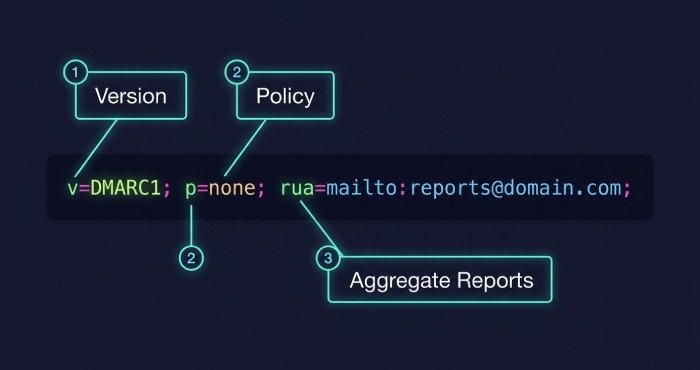
A basic DMARC record may look like this:
v=DMARC1; p=none; rua=mailto:dmarc-reports@example.com; ruf=mailto:dmarc-failures@example.com; adkim=s; aspf=s; pct=100
A DMARC Record Lookup or DMARC checker examines this TXT value and confirms that all tags are valid, properly formatted, and aligned with your intended security posture.
DMARC Policy Options
The DMARC policy tag defines how receivers should treat mail that fails DMARC:
- p=none: Monitor only; no enforcement action is requested.
- p=quarantine: Place failing messages in spam or suspicious mail folders.
- p=reject: Block failing messages at the receiving gateway.
Most organizations begin with none, review reporting, then move toward quarantine and finally reject as confidence improves. This staged approach supports safe DMARC enforcement without harming legitimate traffic.
Subdomain and Policy Distribution
The sp= tag defines the subdomain policy. For example, a parent domain may use p=reject while applying a different policy to subdomains. This matters when your domain infrastructure includes multiple applications, regional mail systems, or third-party senders.
The pct tag controls policy distribution by applying enforcement to only a percentage of failing mail. For example, pct=25 applies the policy to 25% of failing messages, allowing gradual rollout.
SPF, DKIM, and Alignment
DMARC depends on two underlying authentication protocols: SPF and DKIM.
SPF, or Sender Policy Framework, checks whether the sending mail server is authorized to send for the domain found in the Envelope From or Return-Path. DKIM verifies that a message contains a valid DKIM signature created by an authorized domain.
DMARC requires either SPF or DKIM to pass and align with the Header From domain:
- The aspf tag controls SPF alignment.
- The adkim tag controls DKIM alignment.
- Relaxed alignment allows organizational-domain matches.
- Strict alignment requires exact domain matches.
A good DMARC diagnostic tool checks SPF, DKIM, and DMARC together because a valid DMARC record cannot compensate for broken SPF records or missing DKIM signatures.
DMARC Reporting
DMARC includes reporting features that help domain owners understand authentication activity.
Aggregate and Forensic Reports
The rua tag defines where to send an aggregate report, usually in XML format. These reports summarize authentication results, sending IPs, SPF outcomes, DKIM outcomes, and DMARC pass/fail data.
The ruf tag defines where to send a forensic report or failure report. These failure reports may use formats such as afrf or iodef, depending on the receiver. The rf tag specifies the Reporting format, while the ri tag defines the Reporting interval in seconds.
Failure Reporting Controls
The fo tag controls when forensic failure reports are generated. For example, it can request reports when SPF fails, DKIM fails, or both fail. Because forensic data may include sensitive message details, many organizations route ruf reports to a dedicated mailbox or third-party analysis platform.
Using a DMARC Generator to Create a Valid DNS Record
A DMARC generator helps create a correctly structured DMARC record for your domain name. Tools such as EasyDMARC, dmarcian, MXToolbox, a DMARC Record Checker, or a DMARC Inspector can guide administrators through key decisions and reduce syntax errors.
What a DMARC Generator Should Ask
A high-quality generator should ask for:
- The domain name to protect
- Desired policy: none, quarantine, or reject
- Aggregate report address using rua
- Forensic report address using ruf
- SPF alignment mode using aspf
- DKIM alignment mode using adkim
- Percentage enforcement using pct
- Reporting interval using ri
- Failure report behavior using fo
After generating the TXT record, you publish it in DNS under the _dmarc host. A follow-up DMARC Record Lookup should confirm the record is visible globally.
Example DNS TXT Record
For a monitoring phase, your DNS TXT record might be:
v=DMARC1; p=none; rua=mailto:dmarc@example.com; ruf=mailto:forensics@example.com; fo=1; adkim=r; aspf=r; pct=100; ri=86400
This configuration supports DMARC validation, enables reporting, and allows teams to evaluate real traffic before moving to enforcement.
DMARC Record Validation: Common Errors and How to Fix Them
Common DMARC Record Errors
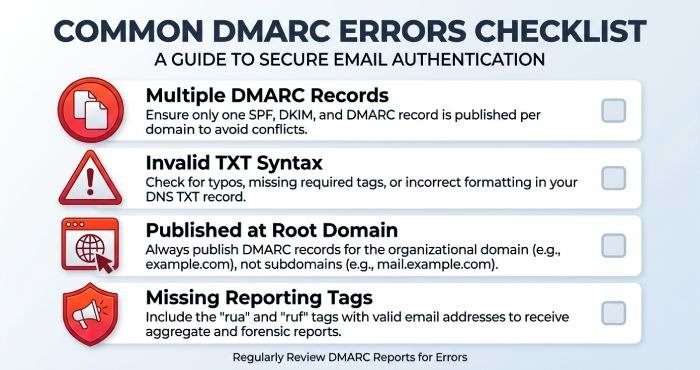
Frequent issues found during a DMARC check include:
- No DMARC record found for the domain name
- Multiple DMARC records published for one domain
- Record published at the root instead of _dmarc.domain.com
- Invalid TXT record syntax
- Incorrect rua or ruf mailto formatting
- Unsupported policy values
- Incorrect adkim or aspf values
- Missing reporting destinations
- Overly permissive p=none used indefinitely
- SPF or DKIM failures that prevent DMARC alignment
A DMARC Record Lookup can also reveal DNS propagation issues, especially after recent changes. If a record was updated but the DMARC checker still shows the old value, check DNS TTL, authoritative nameservers, and hosting provider controls.
How to Fix DMARC Misconfiguration
Start with a structured configuration analysis. Confirm the domain has one DMARC TXT record, validate all tags, and compare expected senders against actual authentication results. If SPF fails, update your SPF include mechanisms and IP addresses. If DKIM fails, confirm the selector, public key, and signing domain. If alignment fails, ensure the Header From domain matches the SPF-authenticated domain or DKIM signing domain according to your chosen alignment mode.
Practical Remediation Action Plan
A practical action plan should include:
- Run a DMARC check using more than one DMARC checker online.
- Perform a DMARC Record Lookup against authoritative DNS.
- Validate SPF and DKIM independently.
- Review aggregate report XML for unknown senders.
- Identify authorized entities and remove unauthorized traffic.
- Move from p=none to quarantine when legitimate mail passes.
- Move from quarantine to reject after confidence is established.
Best Practices for Ongoing DMARC Monitoring and Email Security
Monitor Reports and Sender Changes
Review aggregate report data to identify unknown IP addresses, failed DKIM signature validation, SPF misalignment, and new vendors. Large organizations and MSP-managed environments often have many legitimate senders, including marketing platforms, CRM systems, ticketing tools, and cloud applications.
Use DMARC reporting to distinguish authorized entities from suspicious activity. This supports threat detection, reduces phishing risk, and improves brand protection.
Progress Toward Enforcement Carefully
Do not jump straight to p=reject without evidence. Begin with none, analyze traffic, fix SPF and DKIM issues, then apply quarantine with a limited pct tag if needed. Once authentication protocols are stable and reporting shows legitimate mail is passing, move toward reject for stronger DMARC enforcement.
Recheck DNS and Authentication Regularly
Schedule recurring DMARC check reviews for every important domain name and subdomain. Run a DMARC Record Lookup after any DNS, email platform, or vendor change. Use a trusted DMARC checker to confirm the published TXT record, and pair it with SPF and DKIM tests for complete email authentication coverage.
A mature monitoring program combines DMARC validation, SPF health checks, DKIM key rotation, reporting analysis, and policy management. Together, these practices strengthen domain infrastructure, protect customers from spoofing, and help maintain reliable email deliverability.
Last Updated: August 12, 2026