A data pipeline often begins as a script somebody wrote on a Friday afternoon. It loops over a list of URLs, grabs each page, pulls out a price or a score or a stock level, and writes a row to a CSV. It runs on a laptop or a five dollar server, and it works.
Then someone asks for more. More stores, more regions, hourly instead of daily. A price tracker that watched a few hundred games on one storefront now has to cover every storefront in twenty countries, and the request count picks up three extra zeros.
The script usually needs work to survive that jump. What surprises people is which part of it gives out first.
Do the arithmetic before you touch the code
A thousand requests a day is one request every 86 seconds. You could do that by hand if you were bored enough.
A million a day sounds enormous, but spread evenly it comes to about 11.6 requests per second. If a typical response takes two seconds, you need roughly 23 connections open at any moment. That is a manageable amount of concurrency for many async clients, although bandwidth, parsing work and traffic bursts still affect capacity.
So raw speed is not the problem, and rewriting everything in a faster language will not save you. The problems are the ones that were invisible at a thousand requests because they happened once a week. At a million, anything that goes wrong 2% of the time goes wrong 20,000 times a day.
At 1,000 a day, almost anything works
At this volume, you can often get away with one process, one IP address and a cron job. If it fails, you rerun it. If a page changes its layout, you notice the next morning and fix the selector over coffee.
There is only one habit worth building this early: save the raw response before you parse it. Disk is cheap, and the day your parser turns out to have been reading the wrong field for three weeks, you will be able to fix history instead of losing it.
Somewhere past 10,000, the loop has to go
The first thing to break is the idea of a script that starts at the top of a list and works to the bottom. One slow site holds up everything behind it. A crash at URL 7,400 means starting again from URL 1, or writing awkward code to work out where you were.
Split the job into two pieces. One piece decides what needs fetching and puts those jobs on a queue. Separate workers pull jobs off the queue, fetch the page and report back. Redis, RabbitMQ and SQS all do this fine, and the choice matters far less than making the split.
With acknowledgements and retries configured, the queue makes failures easier to contain. A worker can die without taking the run down with it. You can add workers when you are behind and remove them when you are not. Failed jobs go back on the queue instead of vanishing.
Two rules keep this stage from biting you later. Make every job safe to run twice, because sooner or later it will be. And put a limit on each target site separately, so one fast worker pool does not pile onto a single domain while the rest sit idle.
At 100,000, the websites start noticing you
This is the stage where the trouble moves from your code to the other end of the connection. A few thousand requests from one address blend into the background. A hundred thousand do not. You start seeing 429 responses, CAPTCHA pages, and the nastiest one of all: a normal looking 200 response with the wrong content in it.
Part of the answer is simply manners. Slow down per domain, honour the Retry-After header when a site sends one, and back off properly when you get refused. Retrying a blocked request instantly, ten times, is the quickest way to turn a short timeout into a long ban.
The other part is where your requests come from. Websites can look up who owns an IP address, and a flood of traffic from one cloud provider’s range does not look like shoppers. That is why larger pipelines spread their requests across a rotating pool of residential addresses, so the load arrives looking like the ordinary mix of visitors it is standing in for.
Location matters here too. Regional pricing is the whole point of a lot of this data, and some storefronts use your location to choose which prices to display. Currency settings, cookies and account region may matter too. A service like ProxyEmpire’s proxy network covers this with more than 30 million residential IPs in 170+ countries, and lets you narrow a request down by country, region, city or ISP. In practice it is one more setting on your HTTP client, and the rotation happens on their side.
Whatever you use, start measuring success rate per site, not across the whole run. An overall figure of 97% can hide one target that has been failing every single request since Tuesday.
At a million, the bill and the blind spots take over
By now the pipeline runs. Your attention shifts to keeping it affordable and catching misleading results.
Bandwidth can become the main cost. Proxy traffic is usually billed by the gigabyte, so page weight matters more than request count. A million requests at 500 KB each is 500 GB a day. The same million at 60 KB is 60 GB. Getting from the first number to the second is mostly housekeeping: turn on compression, fetch the HTML without the images and fonts, and call the site’s own JSON endpoints where a page loads its data that way. Keep the headless browser for the pages that really need it, because a full browser downloads everything.
Stop fetching things that have not changed. A back catalogue game does not need its price checked every hour. Sort your targets by how often their prices change and schedule them accordingly. Once you review the schedule, a nominal million-request target might turn into 400,000 well chosen requests. The saving depends on how often your sources actually change.
Give retries a budget. Use exponential backoff with a bit of randomness so workers do not all retry in the same second. Cap the attempts. After the cap, park the job in a dead letter queue where a person can look at it. Without a cap, one broken site will happily eat a third of your daily traffic.
Validate what comes back. A status code tells you the server answered. It does not tell you the answer was the product page. Check that the fields you expect are present and that the values are plausible. A price of zero, an empty title or a page a tenth of its usual size should count as a failure even if the server said 200.
Watch freshness, not just errors. The scariest failure at this scale is silence. A scheduler stops queueing one region, nothing errors because nothing runs, and the dashboard stays green. Track the age of the newest record for each source and alert when it gets old.
What does not change
The rules of decent behaviour are the same at every size. Collect public data, stay away from anything behind a login you do not own, read the terms of the sites you rely on, and keep your request rate at a level the site can shrug off. A pipeline that knocks over its own source is not much of a pipeline.
Build for the next zero, not the last one
It is tempting to design the million request system on day one. Do not. Most projects never get there, and the ones that do will have learned things along the way that would have changed the design anyway.
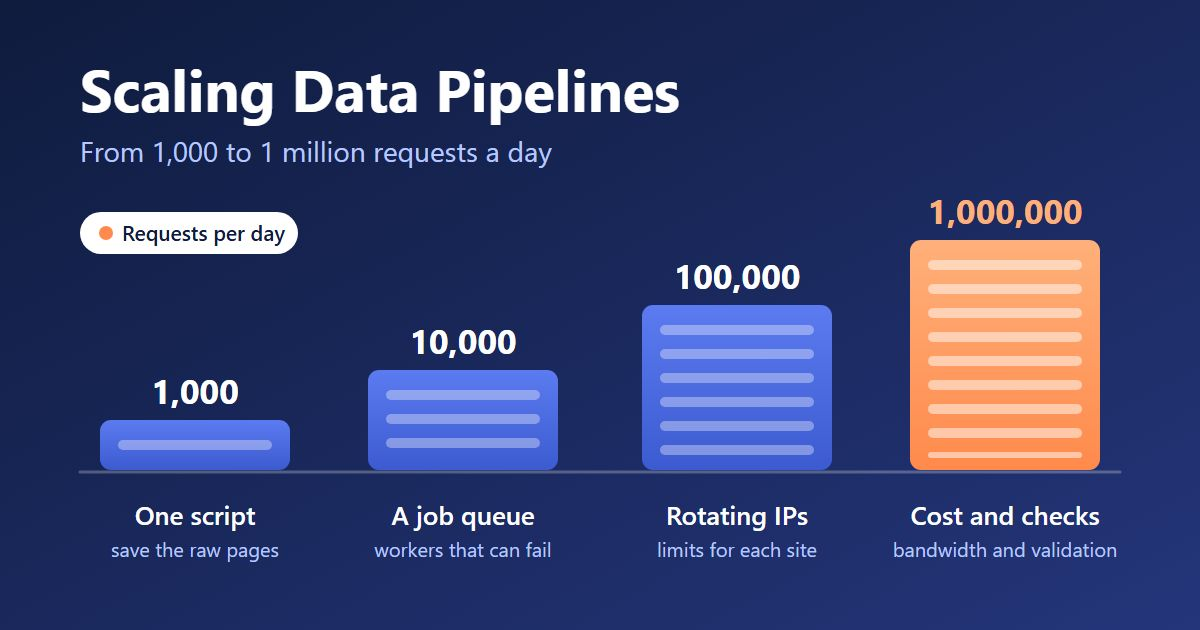
A better rule is to build for ten times what you run today. At a thousand, save your raw pages. At ten thousand, move to a queue. At a hundred thousand, sort out where your requests come from and measure each site on its own. At a million, spend your time on bandwidth, validation and freshness.
A small team might tackle one of these steps in a week or two; the scope and existing system will determine the work involved. Skip them and you end up taking all four at once, usually on the weekend the old script finally falls over.
Last Updated: October 14, 2026